
Description
Plan on your tablet, not on paper — one tap between every section
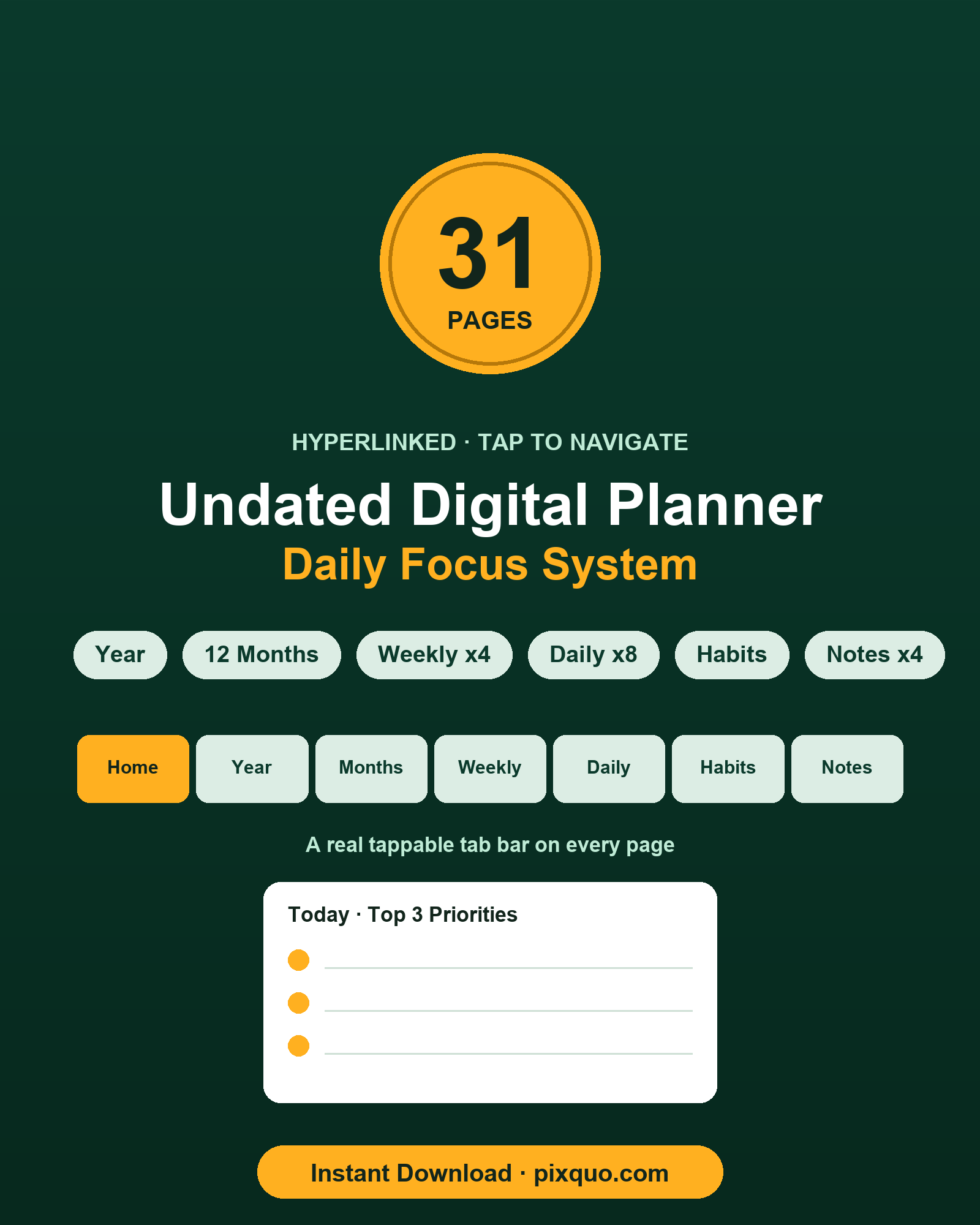
The Undated Hyperlinked Digital Planner is a single PDF built for annotation apps, not the printer. Every page carries a real, tappable tab bar, so you move between your Year overview, monthly calendars, weekly spreads, daily pages, habit tracker and notes without scrolling or hunting for the right page. Because it is undated, you start today, skip the weeks you miss, and reuse it year after year with zero guilt and zero wasted pages.
This is the digital (paperless) edition: the internal links genuinely work. Import the file once, tap a tab, and you land exactly where you meant to. No account, no app lock-in, no subscription.
What’s inside (31 pages, all linked)
- 1 Index / Home page — a clean launchpad that links to every section of the planner.
- 1 Year-at-a-glance page — all twelve months on one screen; tap any month to open its calendar.
- 12 Monthly calendar pages (January–December) — undated 7-column grids with day cells numbered 1–31 and no weekday binding, so a single layout fits any month of any year. Each month links back to the Year page and forward to your weekly spread.
- 4 Weekly spread pages (Week 1–4) — reusable templates with seven day blocks for time-blocking plus dedicated Top Priorities and To-Do columns.
- 8 Daily pages — reusable focus pages with an hourly schedule (6:00–21:00), a Top 3 Priorities box, a large notes area, an 8-cup water row and a six-habit check row.
- 1 Habit tracker page — a 14-row by 31-column grid to shade a box for each day you complete a habit.
- 4 Notes pages — ruled pages for brain-dumps, meeting notes and lists.
Every one of the 31 pages shares the same seven-tab navigation bar — Home, Year, Months, Weekly, Daily, Habits and Notes — and each tab is a working internal hyperlink. The Index and Year pages add extra tappable links so you can jump straight to a specific month or section.
Why undated beats a dated planner
A dated planner starts a countdown the moment you buy it. Miss a fortnight and you are staring at empty, wasted weeks; buy it in March and you have already paid for January and February. An undated system removes that pressure completely. You write the dates yourself, so the planner meets you wherever you are — the first day of a new job, the Monday after a holiday, or the random Wednesday you finally decide to get organised. Every template is reusable, which means the same eight daily pages and four weekly spreads can carry you through a focused sprint, then reset for the next one. Nothing expires, and nothing is ever out of season.
Who it’s for
This planner suits anyone who has moved their planning onto a tablet and a stylus: students mapping a term, freelancers and founders running their own week, remote workers batching deep-focus blocks, and habit-builders who want a visible streak. If you like the structure of a paper planner but want the speed of tap-to-navigate, this is built for you. It also works well as a lightweight second brain — keep the notes pages open for capture, the daily pages for execution, and the habit tracker for the routines you are trying to lock in. Because it lives inside your existing PDF app, it travels on whatever device you already carry, and it syncs through your own cloud storage rather than a third-party planner service.
How to use it
- Download the PDF from your pixquo order (instant download).
- Open it in any PDF annotation app on your tablet, phone or computer.
- Tap the tab bar at the top of any page to jump between sections — try tapping Year, then a month, then Weekly.
- Write directly on the pages with your stylus or keyboard. Because the layouts are undated, fill in the dates yourself and reuse each template as many times as you need.
Formats & compatibility
You receive one portrait PDF file sized for tablet screens. The internal hyperlinks follow the standard PDF specification, so they work in any app that supports PDF link annotations — for example GoodNotes, Notability, Xodo, Adobe Acrobat, and most built-in document readers. These names are given only to describe compatibility; this product is not affiliated with, endorsed by, or connected to any of those apps or companies. If your app of choice opens PDFs and honors internal links, the tabs will work.
Honest note on format
This is a digital-first, tap-to-navigate planner. The hyperlinks are the whole point — you import the single PDF into your annotation app and tap the tabs to move around. It can be printed if you ever want a paper copy, but it is not designed as a printable-first product, and the links obviously do nothing on paper. If you specifically need a print-first planner, choose a printable listing instead.
A simple weekly rhythm
If you are not sure how to run the planner, try this loop. On the Home page, tap into the Year view and glance at the month ahead. Open the current month and mark the deadlines and events you already know about. Jump to a Weekly spread and pull those commitments into day blocks, then set your Top Priorities and To-Do for the week. Each morning, open a Daily page, choose your Top 3 Priorities, block the hours you need, and tick your habits as you go. At the end of the week, review the notes pages and roll anything unfinished into the next weekly spread. The tab bar keeps that whole cycle one tap away, so the review never becomes a chore.
Frequently asked questions
Do the links really work, or is it just a normal PDF?
They really work. Every page has a genuine tab bar of internal PDF link annotations, and the Home and Year pages add extra jump links. Open the file in an app that supports PDF links and tapping a tab takes you straight to that section.
Is it dated or undated?
Completely undated. The monthly grids show day numbers 1–31 with no weekday column and no year, and the weekly and daily pages are reusable templates. You add the dates, so the planner never expires.
Which app do I need?
Any PDF annotation app that supports internal links. Popular choices include GoodNotes, Notability, Xodo and Adobe Acrobat, but nothing is required by name — use whatever PDF app you already have. We are not affiliated with any of those apps.
Can I print it?
Yes, you can print it if you like, but it is designed for tablets and the hyperlinks only function in a PDF app. For a print-first experience a dedicated printable planner is the better fit.
Can I use my stylus and highlighter on it?
Yes. Once it is open in your annotation app you can write, highlight and draw on every page exactly as you would on any imported PDF. The undated templates are made to be written on repeatedly.
Will I get updates or extra files?
You receive the single PDF described above as an instant download. There is no software to install and no subscription.
License & instant download
This is an instant digital download — your file is available immediately after checkout. Your purchase is licensed for personal use and for the small-commercial use of anything you create with the templates (your own plans, notes and trackers). You may not resell, share or redistribute the planner file itself. The design and artwork are original.
Browse more planners in the digital planners collection, or explore the full catalogue at pixquo.com.
Explore More Digital Tools
- Browse the full shop — planners, trackers, prompt packs and printables
- Free printables library
- Budgeting & saving guide · Planners & productivity guide
- Paper sizes & currency by country
Every Pixquo product is an instant download — no shipping, no waiting.
Reviews
There are no reviews yet.