
Description
Most couples plan a wedding in four places at once: the budget in one spreadsheet, the guest list in a phone note, the vendor quotes in an email folder, the seating plan on the back of an envelope. Then the deposits go out and nobody can say how much has been paid and how much is still owed.
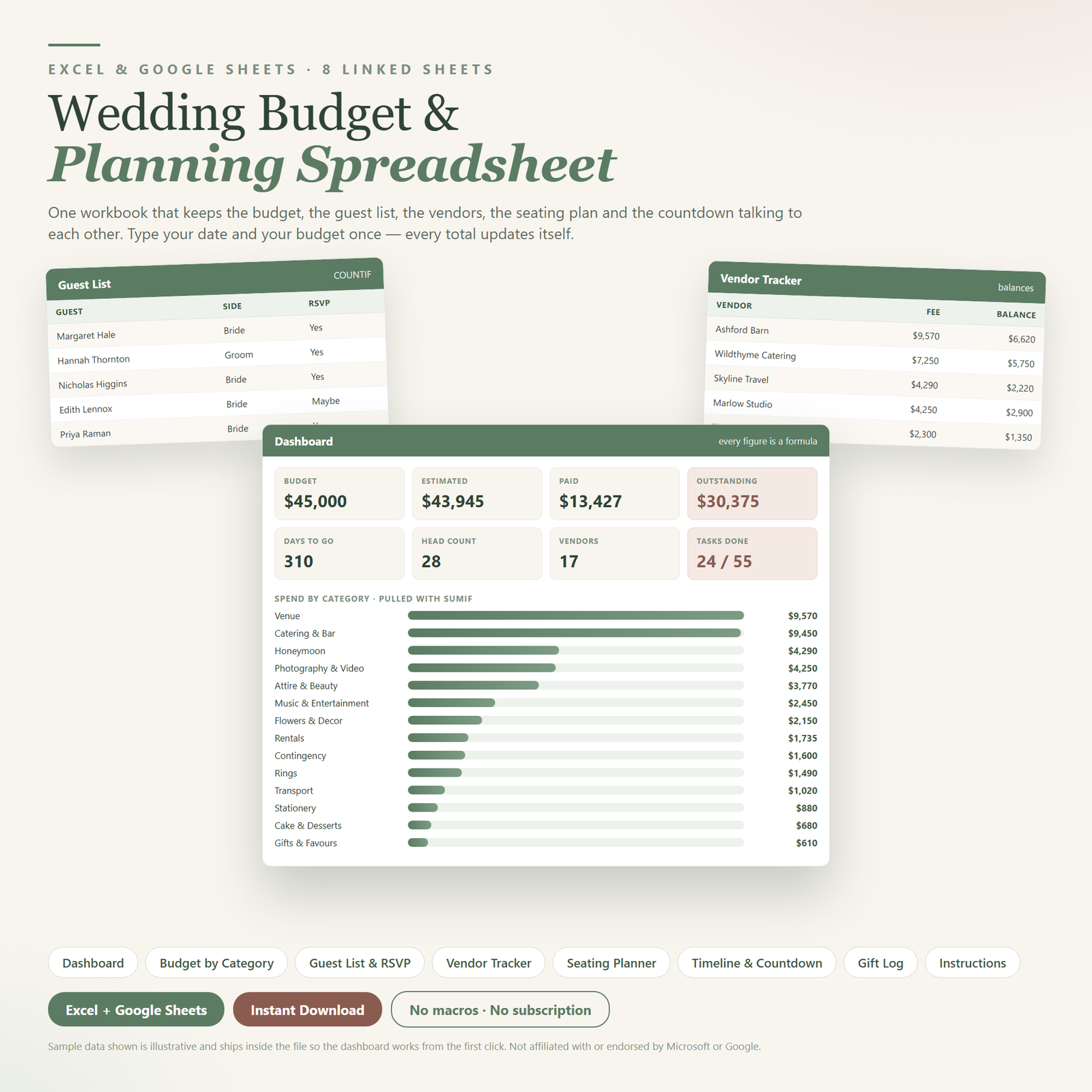
This is one workbook that holds all of it and keeps the parts talking to each other. You type your wedding date once and your total budget once. After that, every countdown, category total, head count and outstanding balance recalculates from the rows you fill in. Change a guest from awaiting to attending and the confirmed head count moves. Log a deposit against the florist and the outstanding balance drops. Nothing is typed twice.
It ships with a full worked example, so the dashboard shows live numbers the second you open it. Clearing the samples takes about two minutes.
What’s inside
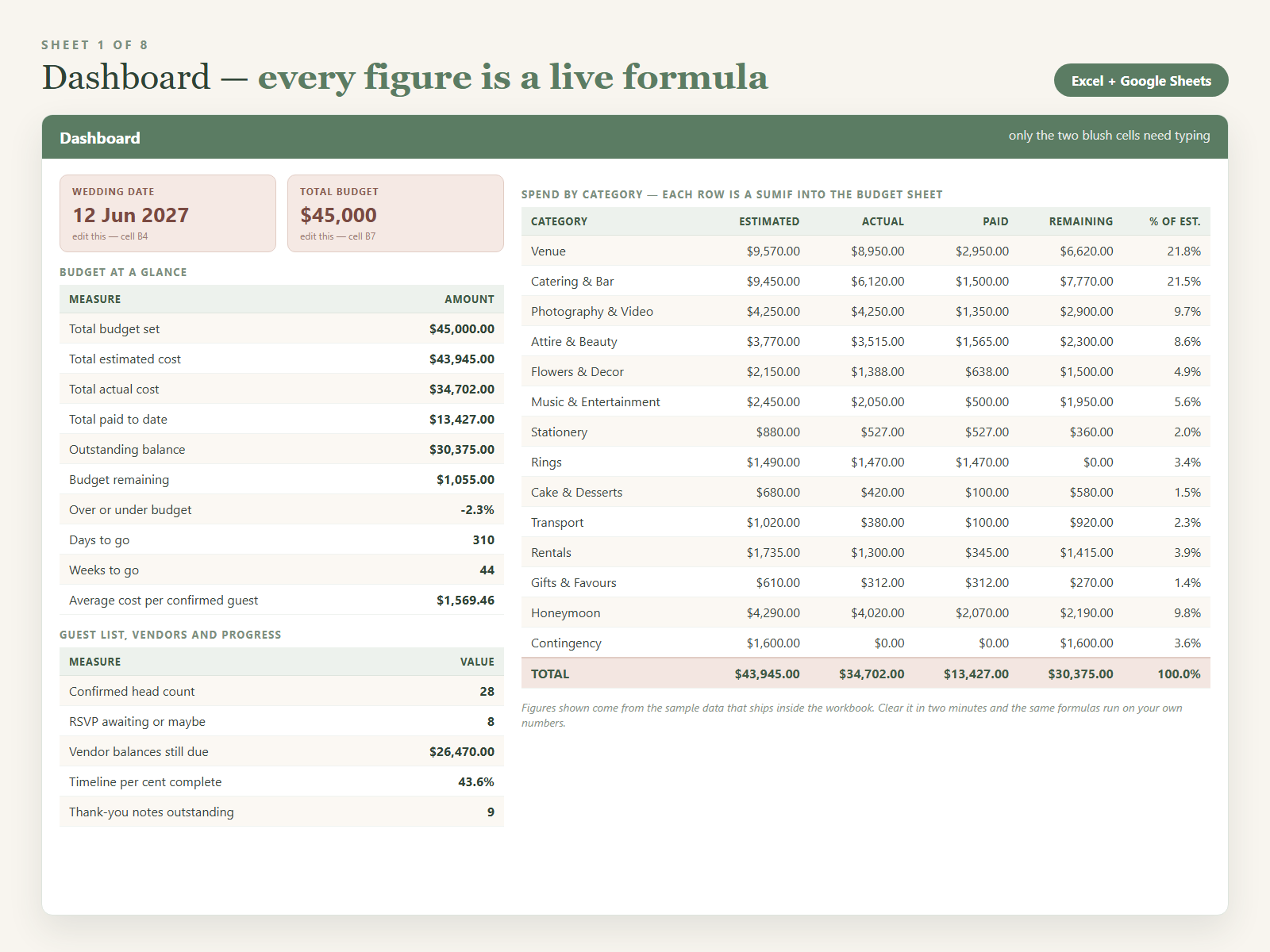
1. Dashboard. The only sheet you type into, and only two cells: a wedding date and a total budget. Everything else is a formula. It shows total budget against total estimated cost, total actual cost, total paid to date and outstanding balance, plus budget remaining, an over-or-under-budget percentage and an average cost per confirmed guest. Underneath, a fourteen-row table pulls Estimated, Actual, Paid and Remaining out of the budget sheet with SUMIF for Venue, Catering & Bar, Photography & Video, Attire & Beauty, Flowers & Decor, Music & Entertainment, Stationery, Rings, Cake & Desserts, Transport, Rentals, Gifts & Favours, Honeymoon and Contingency. Below that sit blocks for the guest list (invitations sent, attending, declined, awaiting, confirmed head count, reply rate), the vendors (fees agreed, deposits paid, balances due, contracts signed) and planning progress (tasks done, per cent complete, thank-yous outstanding). Days and weeks to go run off the date cell.
2. Budget by Category. Seventy rows with Category and Payment Status as dropdowns, alongside Item, Vendor, Estimated Cost, Actual Cost, Deposit / Paid, Due Date and Notes. Two columns calculate themselves. Variance is Actual minus Estimated, formatted red when you are over the estimate and green when you are under, so overruns are visible without reading the number. Balance Due takes the actual cost if you have one, otherwise the estimate, minus what you have paid, and never drops below zero. Payment Status offers Not booked, Deposit paid, Part paid and Paid in full. Forty example lines are filled in.
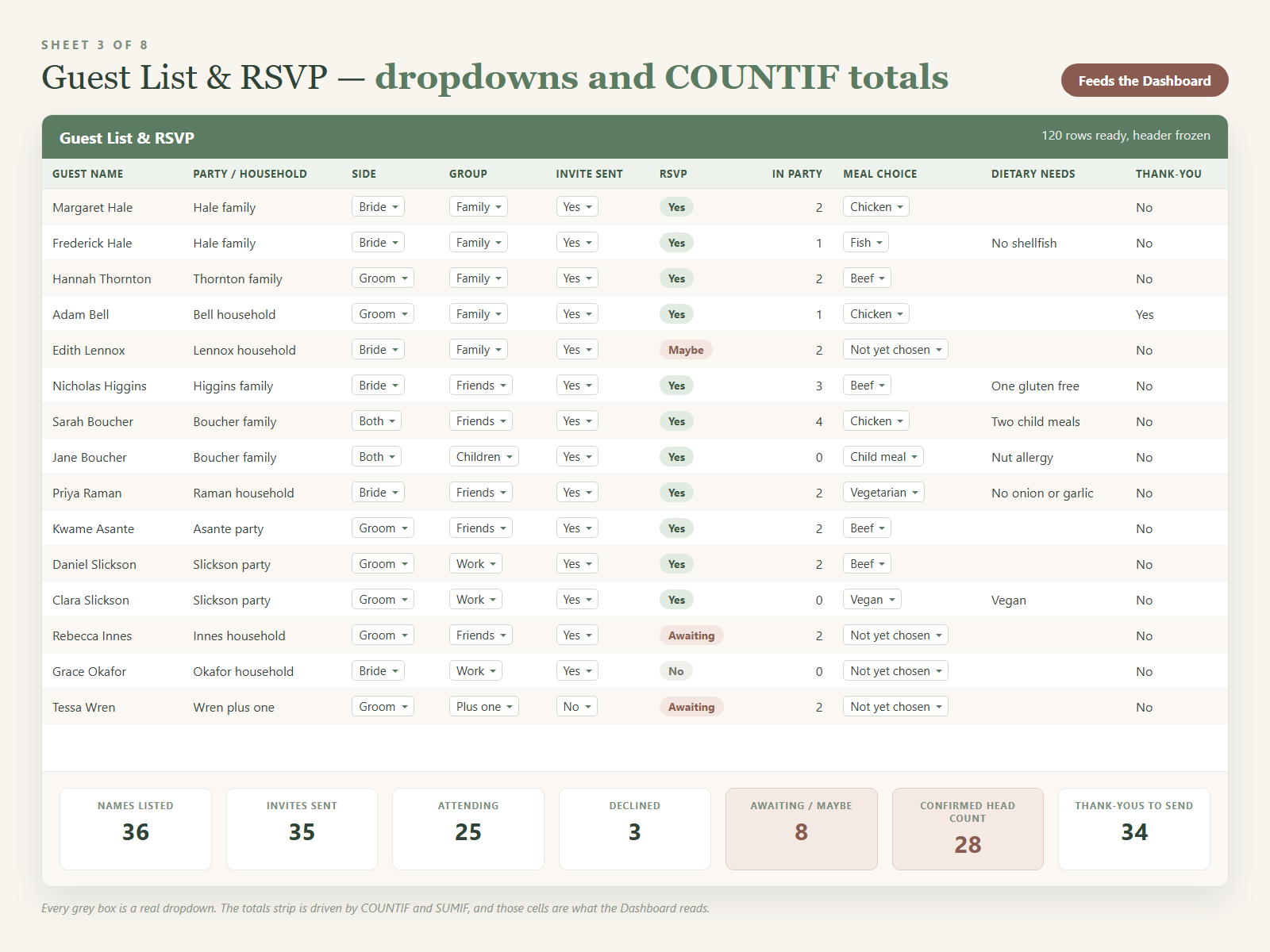
3. Guest List & RSVP. One hundred and twenty rows: Guest Name, Party or Household, Side (Bride, Groom, Both, Other), Group (Family, Friends, Work, Plus one, Children), Invite Sent, RSVP (Awaiting, Yes, No, Maybe), Number in Party, Meal Choice, Dietary Needs, Address and Thank-You Sent. Every fixed-answer column is a dropdown, so nothing gets typed three ways. A totals block underneath uses COUNTIF and SUMIF for invitations sent, attending, declined, awaiting, confirmed head count and thank-yous outstanding — and those cells are exactly what the dashboard reads.
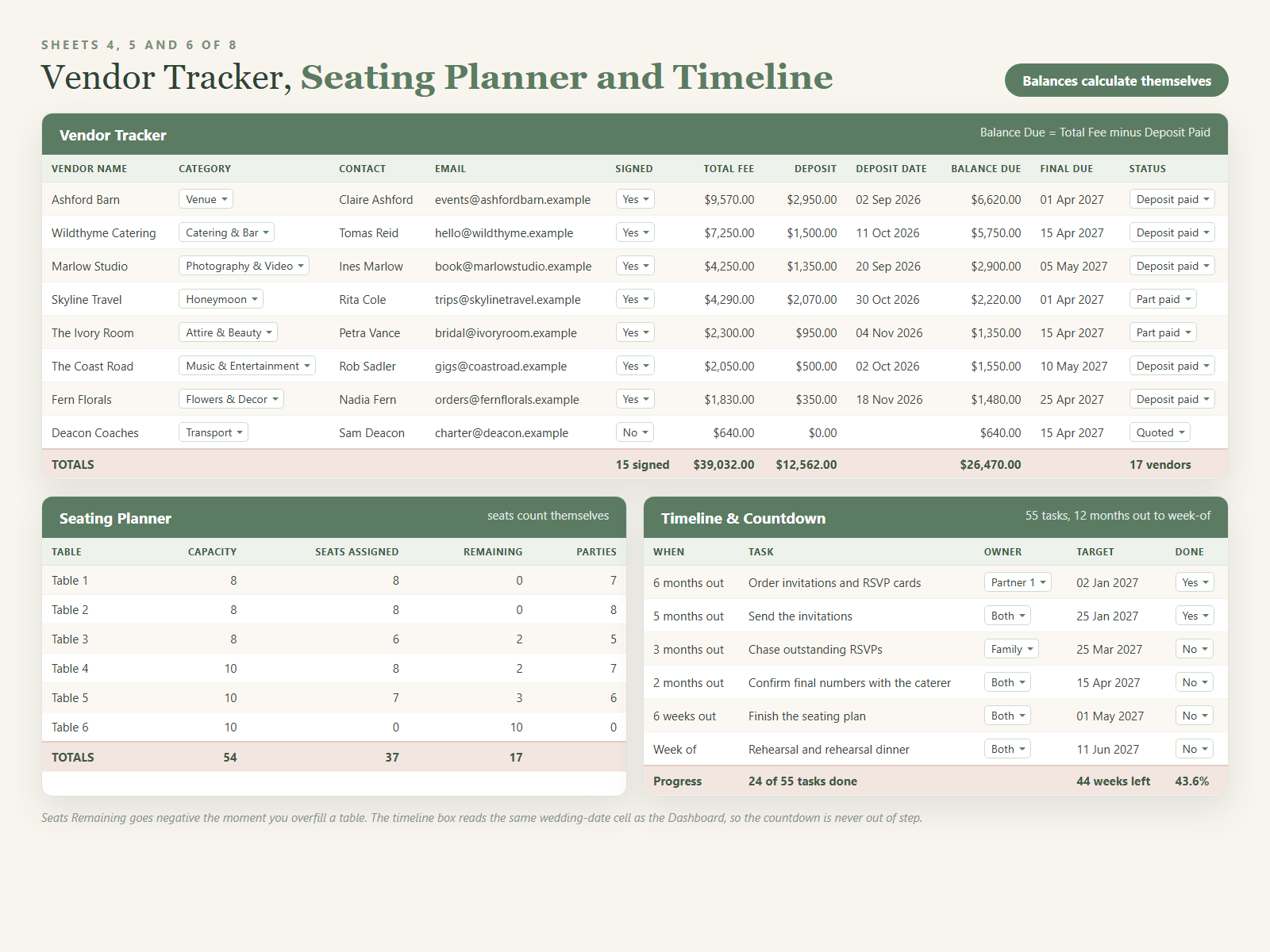
4. Vendor Tracker. Forty rows covering Vendor Name, Category, Contact Name, Phone, Email, Contract Signed, Total Fee, Deposit Paid, Deposit Date, Balance Due, Final Payment Due Date, Status and Notes. Balance Due is Total Fee minus Deposit Paid, and a totals row adds the fees, deposits and balances and counts the signed contracts. This is the sheet that answers the question you get asked six weeks out.
5. Seating Planner. Twenty tables down the left with a capacity you set. On the right, one row per guest or party with the table chosen from a dropdown and a seat count. Seats Assigned adds the seats at each table with SUMIF, Parties Seated counts them with COUNTIF, and Seats Remaining goes negative the moment you overfill a table.
6. Timeline & Countdown. Fifty-five real tasks from twelve months out to the week of the wedding, each with a category, an owner from a dropdown (Partner 1, Partner 2, Both, Family, Planner), a target date and a Done flag. A live box works out weeks remaining from the same date cell as the dashboard and gives a per cent complete.
7. Gift Log. Guest or party, gift description, estimated value, date received, whether the thank-you is written and the date it was sent, with totals for how many notes are still outstanding.
8. Instructions. How the sheets link, which rows to delete to clear the sample data, how to change the currency symbol, how to rename a category without breaking the SUMIF formulas, plus Excel and Google Sheets notes and the licence terms.
Who it’s for
Couples planning it all themselves who want one file rather than six. Anyone who has blown past a rough budget and needs to see, by category, where it went. Parents or family contributing money who want a clear view of what is committed and what is owed. And anyone planning a vow renewal or a large anniversary party.
It is not for everyone. If you want an app that sends reminders, this is a spreadsheet and it will not notify you. If you want a visual floor plan you drag shapes around, the seating planner here is a list with live seat counts. And if the wedding is in three weeks and everything is booked, most of the value has passed.
How to use it
Type your wedding date into Dashboard cell B4 and your total budget into B7 — both are shaded so you can find them. Look at the sample rows to see how a line is filled in, then clear them; the Instructions sheet lists the exact row numbers. Enter your real budget lines first, one row per item, picking a category from the dropdown. Add the vendors you have contacted, then work through the guest list. Go back to the Dashboard and everything has recalculated.
Formats and compatibility
You get one ZIP containing Wedding-Budget-Planning-Spreadsheet.xlsx (eight sheets, about 46 KB) and a plain-text READ-ME-FIRST. The .xlsx opens in Excel 2016 and later, Microsoft 365 and Excel for Mac, and uploads to Google Sheets via File upload then Save as Google Sheets. Every formula used — SUM, SUMIF, COUNTIF, COUNTA, IF, IFERROR, MAX, ROUND, TODAY and N — is supported in both. No macros, nothing to enable. Header rows are frozen and every sheet prints.
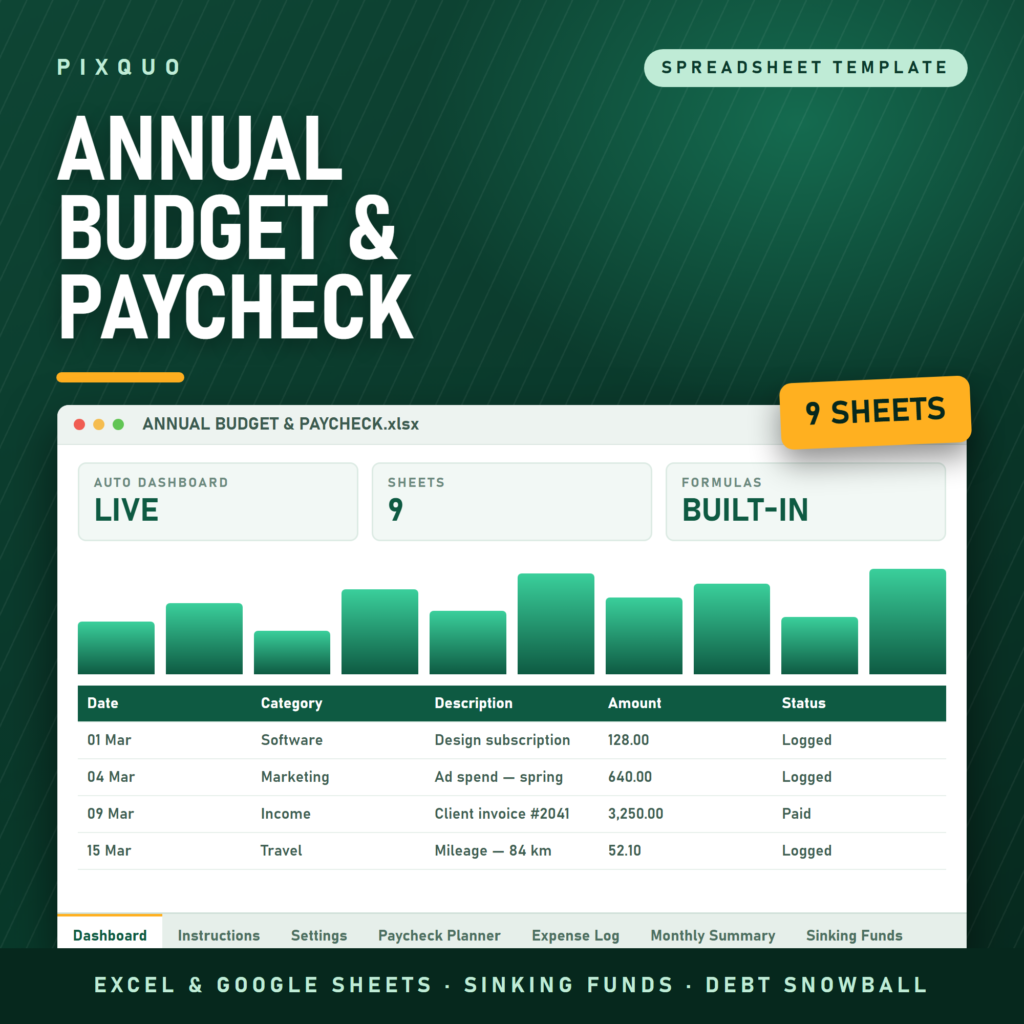
If you would rather write things by hand, the Wedding Planning Binder — 40 Pages covers the same ground as printable undated pages for a ring binder, and plenty of couples run both. If the guest list is the part genuinely out of control, the standalone Wedding Guest List & RSVP Tracker goes deeper on invitations, meal choices and thank-you tracking. And once the wedding is paid for, the Annual Budget & Paycheck Planner Spreadsheet takes the same dashboard approach to household money, paycheck by paycheck.
For wider reading, the budgeting and saving money collection has more spreadsheets for tracking spending and building a fund, and the printable cards, invites and party kits section covers save the dates, invitations and reception stationery.
Will this work on my phone?
You can view and edit it in the Excel or Google Sheets mobile apps and the dropdowns work there, but this many columns is awkward on a small screen. Set it up on a laptop, then use your phone for quick edits like ticking off an RSVP.
Can I actually edit it, or is it locked?
Nothing is locked, protected or password-set. Every cell is editable: add rows, rename categories, change the colours, delete a sheet you do not need. The Instructions sheet lists which columns hold formulas.
Is it dated to a particular year?
No. Every countdown runs off the wedding-date cell you enter and the TODAY function, so it works for a wedding in any year. The dates in the sample data exist only to show a filled-in sheet.
Does it print in black and white?
Yes. The palette is deliberately light, so headers and shaded rows stay readable on a mono printer. For the wider sheets set landscape and Fit to width; the Dashboard prints on one portrait page.
What about refunds?
This is an instant digital download, so it is not returnable once downloaded. If something is wrong with the file itself — it will not open, a formula is broken, a sheet is missing — get in touch and it will be fixed or refunded.
Delivery is instant, with no expiry and no download limit. The template is licensed for personal use by you and your household. It may not be resold, shared, redistributed or bundled.
Microsoft and Excel are trademarks of Microsoft Corporation. Google and Google Sheets are trademarks of Google LLC. This product is an independent template and is not affiliated with, sponsored by, or endorsed by Microsoft or Google. All names and addresses in the sample data are invented.
This workbook is an organisational tool, not financial, legal or tax advice. Consult a qualified professional about your own situation.
Explore More Digital Tools
- Browse the full shop — planners, trackers, prompt packs and printables
- Free printables library
- Budgeting & saving guide · Planners & productivity guide
- Paper sizes & currency by country
Every Pixquo product is an instant download — no shipping, no waiting.

Reviews
There are no reviews yet.