400+ AI Prompts for Real Estate Agents | ChatGPT Pack for Listing Copy, Social Posts, Buyer & Seller Emails, Objections & Farming | PDF

Original price was: $24.99.Current price is: $9.99.
  • Instant download — access right after checkout
  • 📱 Works on any device — phone, tablet or computer
  • 🖨 Print at home — A4 & US Letter where applicable
  • 🔒 Secure checkout & unlimited re-downloads

400+ fill-in-the-blank AI prompts for real estate agents: listings, social, emails, objections. PDF + TXT.

Description

You have three listings going live this month, a seller who wants a weekly update, a buyer who has stopped replying, an open house on Saturday with no promotion written, and a newsletter you have not sent since spring. None of it is hard. All of it is writing. And the writing is what gets pushed to eleven at night, or skipped.

An AI assistant fixes the speed problem and creates a new one. Ask it to write a listing description and you get four sentences of adjectives that could describe any house in the country. Ask it about your market and it will hand you a median price and a days-on-market figure that sound authoritative and are simply made up, because it has never seen your MLS. Copy either one into published marketing and the problem is yours, not the software’s.

This pack is 400 prompts built the other way round. Every single one is a fill-in-the-blank instruction with bracketed variables you complete before you send it: the address, the square footage, the days on market, your fee, your comps, the client’s actual words. No prompt in this pack asks an assistant to produce a statistic, a price, a rate or a market figure. Where a number is needed, it is a blank you fill from your own export. And most prompts end with a guardrail sentence that tells the model what not to do — do not invent, do not speculate beyond what I gave you, describe the property and not the people.

What’s inside

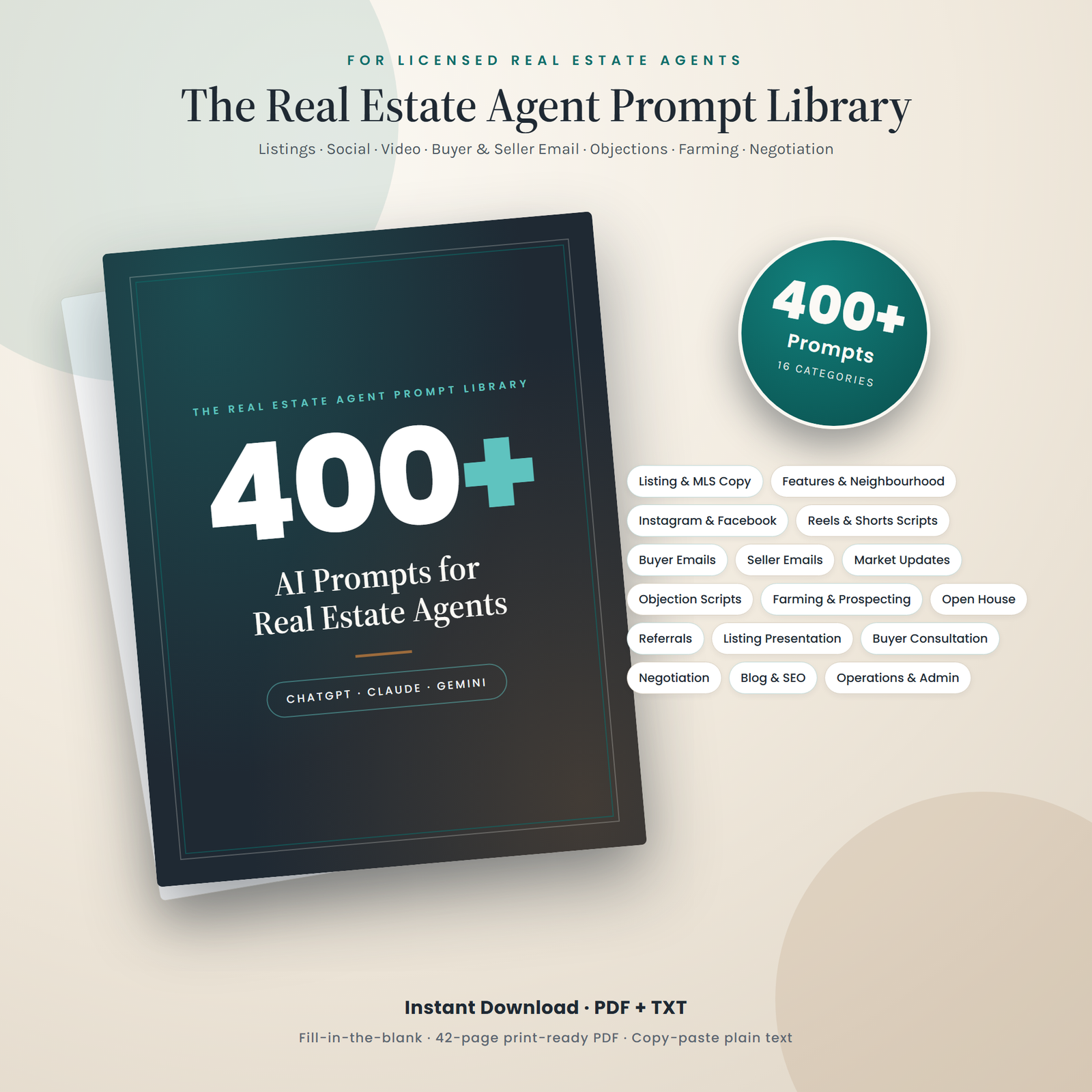
16 categories, 25 prompts each, 400 in total. Delivered as a designed 42-page US Letter PDF and as a plain-text file you can search and copy from without stripping formatting.

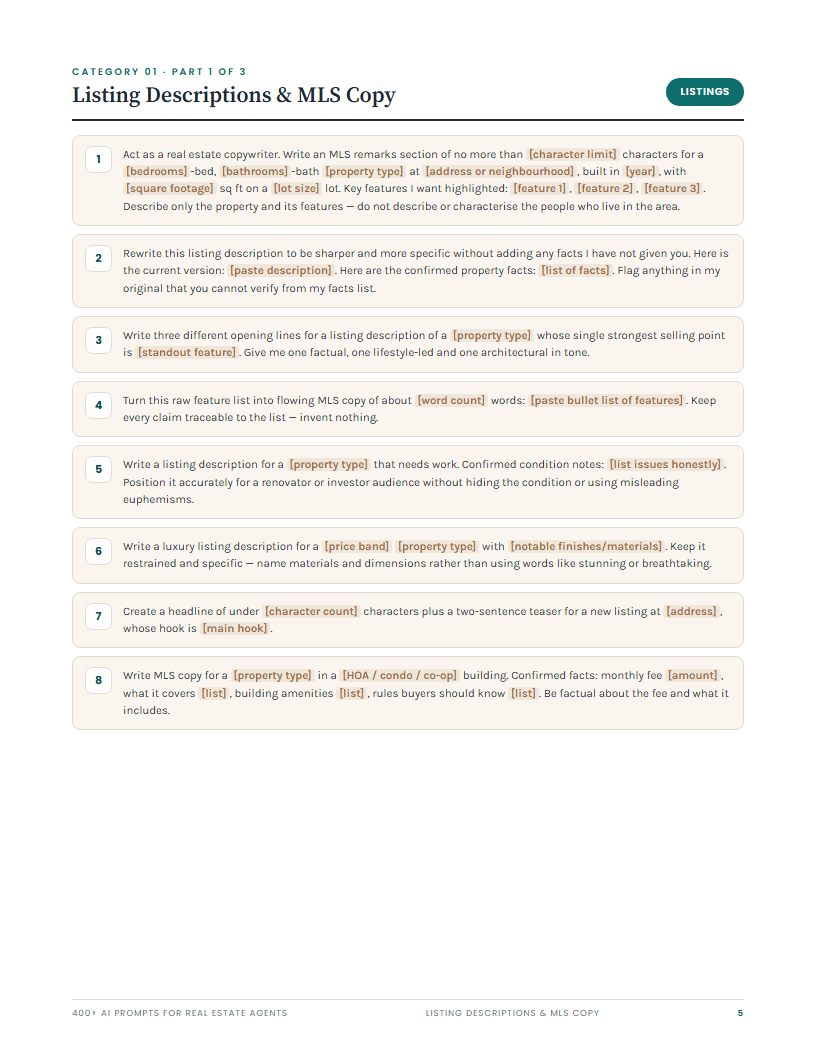
01. Listing descriptions & MLS copy. MLS remarks written to a character limit you set, luxury copy that names materials instead of saying “stunning”, honest copy for a property that needs work, income-property copy that presents your rent roll exactly as supplied, a relaunch description for a listing that has been sitting, and a prompt that audits an existing description for exaggeration and hands back a factual replacement for every challengeable phrase.

02. Property features & neighbourhood highlights. Room-by-room descriptions from your dimensions, kitchen and primary-suite paragraphs, storage and parking copy, major-system replacement lists, energy-efficiency copy that describes what is installed rather than estimating savings, and neighbourhood-amenity paragraphs built only from the places and distances you supply.

03. Social media posts. New-listing carousels, just-sold posts, local business features, price-improvement posts framed as repositioning rather than panic, myth-vs-fact posts using your facts, a month of content ideas, and hashtag sets.

04. Short-form video scripts & hooks. Listing tours with the voiceover and on-screen text separated, three-second hooks with a note on which to test first, walkthrough scripts that move room to room, red-flag formats, and a prompt that cuts one long piece of content into several separate short scripts.

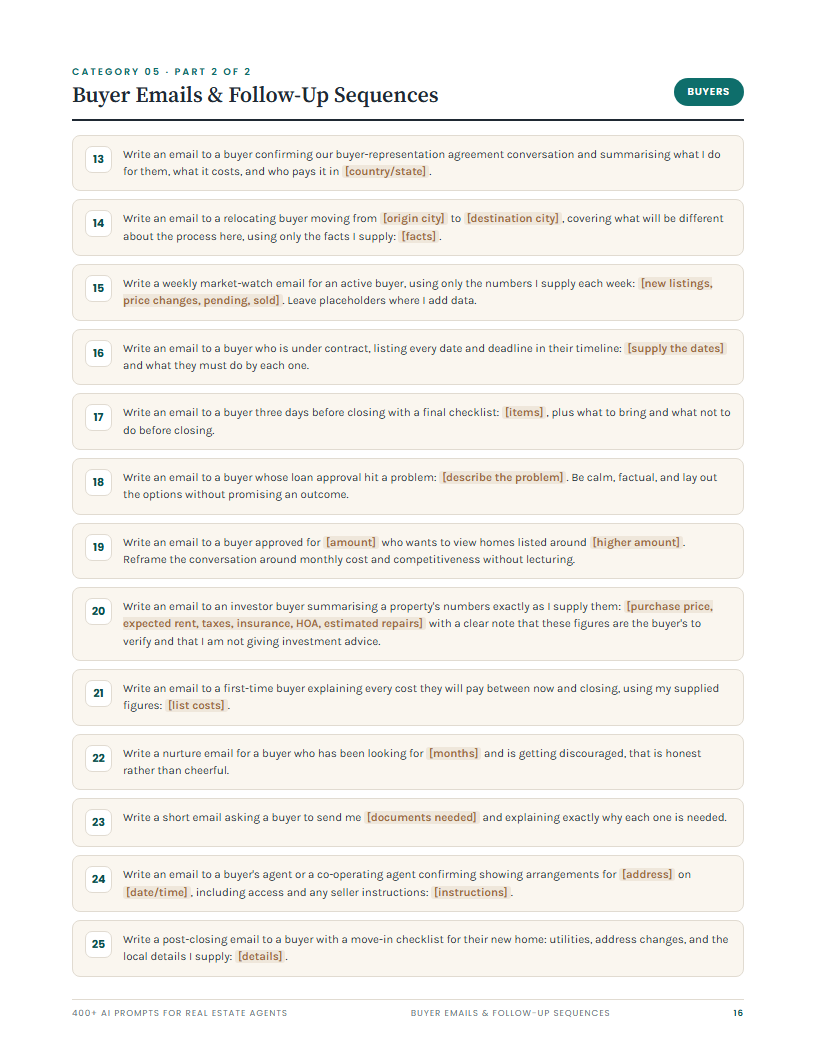
05. Buyer emails & follow-up sequences. First response to a portal enquiry, a five-email sequence for a lead who has gone quiet, post-showing recaps, competitive-situation preparation, inspection-result framing, the under-contract timeline with every deadline listed, the three-days-before-closing checklist, and the honest email to a buyer who has been looking for months and is discouraged.

06. Seller emails & listing-appointment follow-up. Appointment requests, the comps email that explains your selection method, the weekly update template with slots for showings and feedback, the email after several weeks with no offers that names the problem, offer presentation that separates neutral summary from your recommendation, multiple-offer comparison, and the listing-expiry email that offers renewal or a clean release.

07. Market update & neighbourhood report copy. Monthly and quarterly report copy where you supply every figure and name the source, explainers for months of supply and median price, a prompt that strips forecasts and guarantees out of a draft you have already written, and a caveats section on data lag and small sample sizes.

08. Objection handling & scripts. Commission, “another agent said less”, “I think it is worth more”, “we will wait for rates”, FSBO, “my relative is an agent”, “we had a bad experience”, “just bring me a full-price offer”, expired sellers, and a script for a seller who wants to hide a known defect that is unambiguous about disclosure. Fee scripts state plainly that fees are negotiable.

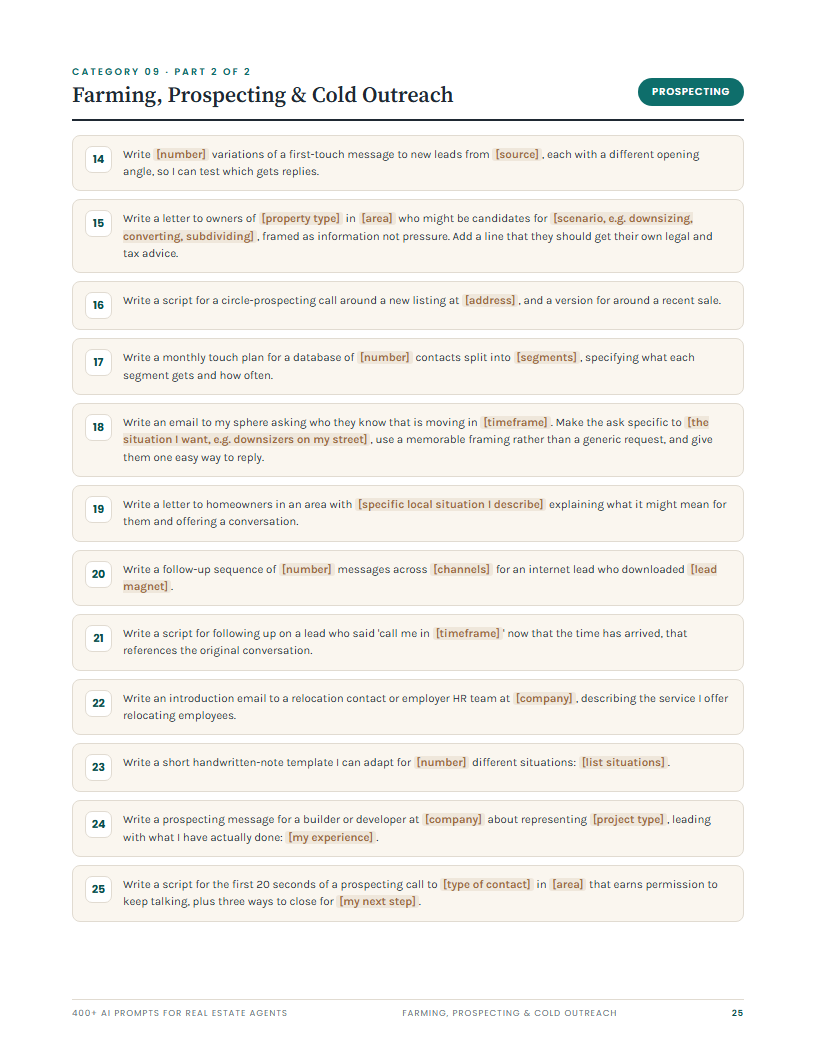
09. Farming, prospecting & cold outreach. Farming letters, just-listed and just-sold cards, door-knocking scripts, circle prospecting, absentee-owner letters, a cold-call script that includes a reminder to check do-not-call rules first, and a monthly touch plan by database segment.

10. Open house. The full promotion pack in one prompt, neighbour previews, signage and handout copy, a sign-in greeting that gets real contact details without feeling like an interrogation, three-question qualification, same-day follow-up, the non-poaching email for a visitor who already has an agent, and the seller recap.

11. Referrals & past-client reactivation. Specific referral asks rather than “keep me in mind”, home-anniversary emails, review requests with your links, the reactivation email that acknowledges the gap honestly, the annual home-value review offer, and a response to a critical review that leads with ownership.

12. Listing presentation & pre-listing packet. Section-by-section outline, the pricing-strategy section that explains method without promising an outcome, the marketing plan with the purpose of each item, the net-proceeds explainer, competitive positioning against the listings you will compete with, and a leave-behind one-pager.

13. Buyer consultation & first-time-buyer education. Consultation agendas, upfront and ongoing cost explainers using your figures, contingency and appraisal explainers, a first-time-buyer glossary, viewing checklists, and the script for telling someone their budget does not match their criteria.

14. Negotiation, offers & counter-offers. Offer cover notes that stay strictly on terms, counter-offer summaries, a negotiation plan with an opening, a landing point and a walk-away trigger, appraisal-shortfall paths, the multiple-offer call script that gives every agent identical information, and the post-negotiation recap that documents what changed.

15. Blog, newsletter & SEO content. Long-tail blog posts, neighbourhood guides, title tags and meta descriptions, pillar-page outlines with an internal linking plan, an about page built only from your real background, and a prompt that turns one post into a newsletter, a LinkedIn post and two social posts.

16. Business operations & admin. CRM note templates, transaction and listing-launch checklists with an owner for every task, time-blocking that protects prospecting hours, vendor briefs, weekly status updates for all parties, a lead-response standard by source, an annual planning worksheet driven by your own numbers, and a closing-day checklist.

The PDF also carries a start-here section with a context line to paste at the top of a chat — a single paragraph that tells the assistant to use only the data you give it, never to invent figures, and to follow fair-housing advertising rules for the rest of the conversation.

Who it’s for

The agent who is good on the phone and slow at the keyboard. You can win a listing appointment and lose an evening writing the follow-up email. These give you the draft in thirty seconds.

The newer agent who does not have scripts yet. Objection handling, buyer consultations and listing presentations are the three places new agents lose deals. Three of the sixteen categories cover exactly those.

The solo agent with no marketing assistant. Social, video, blog, newsletter and market updates are five categories here, and all of them run off your own data.

The team lead standardising output. A shared library of prompts is how you stop five agents publishing five different qualities of listing copy. Note the licence is per person — a team needs a copy each.

Who it is not for. If you want push-button copy you can publish unread, this is the wrong product: every prompt requires you to fill in real details first, and the pack tells you repeatedly to fact-check the output. If you were hoping for prompts that generate market statistics for you, this deliberately does not do that, because no assistant can do it truthfully.

How to use it

Open the plain-text file and keep it in a tab. Paste the context line from page three into a new chat — it takes about fifteen seconds and it governs the whole conversation. Search the text file for the job you are doing: “open house”, “expired”, “counter”, “appraisal”, “farming”. Copy the prompt, replace every bracketed blank with your real details, and send it. Read the first output as a draft and ask for changes in plain language: shorter, warmer, less salesy, three versions, fit it in 250 characters. Then check every figure, date and deadline against the source document before it leaves your desk.

Formats and compatibility

One ZIP containing three files. 400-AI-Prompts-Real-Estate-Agents.pdf is 42 pages at US Letter (8.5 x 11in), designed with a cover, two how-to-use pages, a contents page, sixteen category sections with numbered prompt cards, and a terms page. 400-AI-Prompts-Real-Estate-Agents.txt has the same 400 prompts in searchable plain text. READ-ME-FIRST.txt covers usage, the fair-housing note, the licence and the disclaimers.

The PDF opens in any PDF reader on Windows, Mac, iPad, iPhone or Android — no software to buy, nothing to install. Print it at 100% scale on US Letter, or use “shrink oversized pages” for A4. Pages are designed to stay readable in greyscale, so black-and-white printing is fine. The prompts themselves are plain English and work in ChatGPT, Claude, Gemini, Copilot and other assistants, on free tiers as well as paid ones.

If your business runs wider than real estate, the same fill-in-the-blank approach covers it. Agents who also run a side business or manage other marketing usually pair this with the 500+ ChatGPT Prompts for Small Business Owners, which handles pricing, hiring, customer service and operations rather than transactions. If your bottleneck is the content calendar rather than the deals, the 300+ ChatGPT Prompts for Social Media Managers goes much deeper on captions, hooks, campaign planning and platform-specific formats than the two social categories here can. And if you want a shorter, lower-priced starting point before committing to the full 400, the ChatGPT Real Estate 250 pack covers the same territory at a smaller scale.

Two free guides on this site are worth reading alongside it. Digital product side hustles is useful if you are thinking about packaging your own market knowledge into something you sell rather than give away, which a surprising number of agents end up doing. Planners and productivity covers the systems side — time blocking, follow-up discipline and the routines that make category 16 of this pack actually stick.

Do I need a paid AI subscription for these to work?

No. The prompts are plain-English instructions with no special syntax, so they work on the free tiers of ChatGPT, Claude and Gemini as well as the paid ones. Paid tiers generally give you longer conversations, better handling of pasted documents and fewer usage limits, which helps when you are pasting in a full comps export or a long set of walkthrough notes. But nothing in the pack requires it.

Will these produce fair-housing compliant copy automatically?

No, and any product that claims otherwise is overselling. What this pack does is write the prompts defensively: neighbourhood and feature prompts instruct the model to describe the property and the physical area rather than the residents, the recommended context line sets the same rule for the whole conversation, and two prompts exist purely to audit copy you have already written and flag anything that could read as steering. That is a checking aid, not a legal opinion. You remain responsible for compliance with fair-housing law, your MLS and board rules, your brokerage policy and your local advertising regulations. If a piece of copy makes you hesitate, ask your broker before it goes out.

Does it go out of date?

The prompts are written around tasks rather than around any tool’s current interface or any market condition, so they do not expire the way a screenshot-based tutorial does. Deliberately, no prompt contains a market figure, a rate or a statistic — every number comes from you at the moment you use it, which is exactly why the pack stays current. If your local rules or forms change, the bracketed blanks are where that lives, so you update the input rather than the prompt.

Can I edit the prompts or use them for client work I get paid for?

Yes to both. Edit them, shorten them, merge two together, save your favourites into your CRM as templates — that is the intended use. The output is yours to use in your own real estate practice, including work you are paid for as an agent. What the personal-use licence does not allow is reselling, redistributing, sharing the files, uploading them to a public prompt library, or repackaging the prompts as your own product, course, lead magnet or team resource. One purchase covers one person.

Will it print properly in black and white?

Yes. The pages use a charcoal, teal and warm off-white palette chosen so that the contrast holds up in greyscale — the bracketed variables stay visibly distinct from the surrounding instruction even without colour. Print at 100% scale on US Letter rather than “fit to page”, which shrinks the margins unnecessarily. All content sits inside a half-inch margin, so A4 printing with “shrink oversized pages” also works and loses only a few millimetres of white space.

Instant download. The ZIP is available immediately after checkout — nothing is posted and nothing is waiting on approval.

Licence: personal use, one person, within your own real estate practice. Not for resale, redistribution, sharing or repackaging.

Not financial, legal or tax advice. This is a writing and organisational tool. Nothing in it, and nothing an AI assistant produces from it, constitutes advice on a transaction, a contract, a valuation, a tax position or a legal obligation. Consult a qualified professional about your own situation and your clients’ situations. No income, listing, lead or sales result is promised or implied.

Trademarks. These prompts are model-agnostic and work with ChatGPT, Claude, Gemini and other assistants. ChatGPT is a trademark of OpenAI; Claude is a trademark of Anthropic; Gemini and Google are trademarks of Google LLC; Copilot is a trademark of Microsoft; REALTOR® is a registered trademark of the National Association of REALTORS®. This product is independent and is not affiliated with, endorsed by, sponsored by or associated with OpenAI, Anthropic, Google, Microsoft, the National Association of REALTORS®, any board or association of REALTORS®, any multiple listing service, or any brokerage. All marks are the property of their respective owners and are used descriptively only.

Explore More Digital Tools

Every Pixquo product is an instant download — no shipping, no waiting.
Reviews

There are no reviews yet.

Be the first to review “400+ AI Prompts for Real Estate Agents | ChatGPT Pack for Listing Copy, Social Posts, Buyer & Seller Emails, Objections & Farming | PDF”

Your email address will not be published. Required fields are marked *

Product Details

You have three listings going live this month, a seller who wants a weekly update, a buyer who has stopped replying, an open house on Saturday with no promotion written, and a newsletter you have not sent since spring. None of it is hard. All of it is writing. And the writing is what gets pushed to eleven at night, or skipped.

An AI assistant fixes the speed problem and creates a new one. Ask it to write a listing description and you get four sentences of adjectives that could describe any house in the country. Ask it about your market and it will hand you a median price and a days-on-market figure that sound authoritative and are simply made up, because it has never seen your MLS. Copy either one into published marketing and the problem is yours, not the software's.

This pack is 400 prompts built the other way round. Every single one is a fill-in-the-blank instruction with bracketed variables you complete before you send it: the address, the square footage, the days on market, your fee, your comps, the client's actual words. No prompt in this pack asks an assistant to produce a statistic, a price, a rate or a market figure. Where a number is needed, it is a blank you fill from your own export. And most prompts end with a guardrail sentence that tells the model what not to do — do not invent, do not speculate beyond what I gave you, describe the property and not the people.

What's inside

16 categories, 25 prompts each, 400 in total. Delivered as a designed 42-page US Letter PDF and as a plain-text file you can search and copy from without stripping formatting.

01. Listing descriptions & MLS copy. MLS remarks written to a character limit you set, luxury copy that names materials instead of saying "stunning", honest copy for a property that needs work, income-property copy that presents your rent roll exactly as supplied, a relaunch description for a listing that has been sitting, and a prompt that audits an existing description for exaggeration and hands back a factual replacement for every challengeable phrase.

02. Property features & neighbourhood highlights. Room-by-room descriptions from your dimensions, kitchen and primary-suite paragraphs, storage and parking copy, major-system replacement lists, energy-efficiency copy that describes what is installed rather than estimating savings, and neighbourhood-amenity paragraphs built only from the places and distances you supply.

03. Social media posts. New-listing carousels, just-sold posts, local business features, price-improvement posts framed as repositioning rather than panic, myth-vs-fact posts using your facts, a month of content ideas, and hashtag sets.

04. Short-form video scripts & hooks. Listing tours with the voiceover and on-screen text separated, three-second hooks with a note on which to test first, walkthrough scripts that move room to room, red-flag formats, and a prompt that cuts one long piece of content into several separate short scripts.

05. Buyer emails & follow-up sequences. First response to a portal enquiry, a five-email sequence for a lead who has gone quiet, post-showing recaps, competitive-situation preparation, inspection-result framing, the under-contract timeline with every deadline listed, the three-days-before-closing checklist, and the honest email to a buyer who has been looking for months and is discouraged.

06. Seller emails & listing-appointment follow-up. Appointment requests, the comps email that explains your selection method, the weekly update template with slots for showings and feedback, the email after several weeks with no offers that names the problem, offer presentation that separates neutral summary from your recommendation, multiple-offer comparison, and the listing-expiry email that offers renewal or a clean release.

07. Market update & neighbourhood report copy. Monthly and quarterly report copy where you supply every figure and name the source, explainers for months of supply and median price, a prompt that strips forecasts and guarantees out of a draft you have already written, and a caveats section on data lag and small sample sizes.

08. Objection handling & scripts. Commission, "another agent said less", "I think it is worth more", "we will wait for rates", FSBO, "my relative is an agent", "we had a bad experience", "just bring me a full-price offer", expired sellers, and a script for a seller who wants to hide a known defect that is unambiguous about disclosure. Fee scripts state plainly that fees are negotiable.

09. Farming, prospecting & cold outreach. Farming letters, just-listed and just-sold cards, door-knocking scripts, circle prospecting, absentee-owner letters, a cold-call script that includes a reminder to check do-not-call rules first, and a monthly touch plan by database segment.

10. Open house. The full promotion pack in one prompt, neighbour previews, signage and handout copy, a sign-in greeting that gets real contact details without feeling like an interrogation, three-question qualification, same-day follow-up, the non-poaching email for a visitor who already has an agent, and the seller recap.

11. Referrals & past-client reactivation. Specific referral asks rather than "keep me in mind", home-anniversary emails, review requests with your links, the reactivation email that acknowledges the gap honestly, the annual home-value review offer, and a response to a critical review that leads with ownership.

12. Listing presentation & pre-listing packet. Section-by-section outline, the pricing-strategy section that explains method without promising an outcome, the marketing plan with the purpose of each item, the net-proceeds explainer, competitive positioning against the listings you will compete with, and a leave-behind one-pager.

13. Buyer consultation & first-time-buyer education. Consultation agendas, upfront and ongoing cost explainers using your figures, contingency and appraisal explainers, a first-time-buyer glossary, viewing checklists, and the script for telling someone their budget does not match their criteria.

14. Negotiation, offers & counter-offers. Offer cover notes that stay strictly on terms, counter-offer summaries, a negotiation plan with an opening, a landing point and a walk-away trigger, appraisal-shortfall paths, the multiple-offer call script that gives every agent identical information, and the post-negotiation recap that documents what changed.

15. Blog, newsletter & SEO content. Long-tail blog posts, neighbourhood guides, title tags and meta descriptions, pillar-page outlines with an internal linking plan, an about page built only from your real background, and a prompt that turns one post into a newsletter, a LinkedIn post and two social posts.

16. Business operations & admin. CRM note templates, transaction and listing-launch checklists with an owner for every task, time-blocking that protects prospecting hours, vendor briefs, weekly status updates for all parties, a lead-response standard by source, an annual planning worksheet driven by your own numbers, and a closing-day checklist.

The PDF also carries a start-here section with a context line to paste at the top of a chat — a single paragraph that tells the assistant to use only the data you give it, never to invent figures, and to follow fair-housing advertising rules for the rest of the conversation.

Who it's for

The agent who is good on the phone and slow at the keyboard. You can win a listing appointment and lose an evening writing the follow-up email. These give you the draft in thirty seconds.

The newer agent who does not have scripts yet. Objection handling, buyer consultations and listing presentations are the three places new agents lose deals. Three of the sixteen categories cover exactly those.

The solo agent with no marketing assistant. Social, video, blog, newsletter and market updates are five categories here, and all of them run off your own data.

The team lead standardising output. A shared library of prompts is how you stop five agents publishing five different qualities of listing copy. Note the licence is per person — a team needs a copy each.

Who it is not for. If you want push-button copy you can publish unread, this is the wrong product: every prompt requires you to fill in real details first, and the pack tells you repeatedly to fact-check the output. If you were hoping for prompts that generate market statistics for you, this deliberately does not do that, because no assistant can do it truthfully.

How to use it

Open the plain-text file and keep it in a tab. Paste the context line from page three into a new chat — it takes about fifteen seconds and it governs the whole conversation. Search the text file for the job you are doing: "open house", "expired", "counter", "appraisal", "farming". Copy the prompt, replace every bracketed blank with your real details, and send it. Read the first output as a draft and ask for changes in plain language: shorter, warmer, less salesy, three versions, fit it in 250 characters. Then check every figure, date and deadline against the source document before it leaves your desk.

Formats and compatibility

One ZIP containing three files. 400-AI-Prompts-Real-Estate-Agents.pdf is 42 pages at US Letter (8.5 x 11in), designed with a cover, two how-to-use pages, a contents page, sixteen category sections with numbered prompt cards, and a terms page. 400-AI-Prompts-Real-Estate-Agents.txt has the same 400 prompts in searchable plain text. READ-ME-FIRST.txt covers usage, the fair-housing note, the licence and the disclaimers.

The PDF opens in any PDF reader on Windows, Mac, iPad, iPhone or Android — no software to buy, nothing to install. Print it at 100% scale on US Letter, or use "shrink oversized pages" for A4. Pages are designed to stay readable in greyscale, so black-and-white printing is fine. The prompts themselves are plain English and work in ChatGPT, Claude, Gemini, Copilot and other assistants, on free tiers as well as paid ones.

If your business runs wider than real estate, the same fill-in-the-blank approach covers it. Agents who also run a side business or manage other marketing usually pair this with the 500+ ChatGPT Prompts for Small Business Owners, which handles pricing, hiring, customer service and operations rather than transactions. If your bottleneck is the content calendar rather than the deals, the 300+ ChatGPT Prompts for Social Media Managers goes much deeper on captions, hooks, campaign planning and platform-specific formats than the two social categories here can. And if you want a shorter, lower-priced starting point before committing to the full 400, the ChatGPT Real Estate 250 pack covers the same territory at a smaller scale.

Two free guides on this site are worth reading alongside it. Digital product side hustles is useful if you are thinking about packaging your own market knowledge into something you sell rather than give away, which a surprising number of agents end up doing. Planners and productivity covers the systems side — time blocking, follow-up discipline and the routines that make category 16 of this pack actually stick.

Do I need a paid AI subscription for these to work?

No. The prompts are plain-English instructions with no special syntax, so they work on the free tiers of ChatGPT, Claude and Gemini as well as the paid ones. Paid tiers generally give you longer conversations, better handling of pasted documents and fewer usage limits, which helps when you are pasting in a full comps export or a long set of walkthrough notes. But nothing in the pack requires it.

Will these produce fair-housing compliant copy automatically?

No, and any product that claims otherwise is overselling. What this pack does is write the prompts defensively: neighbourhood and feature prompts instruct the model to describe the property and the physical area rather than the residents, the recommended context line sets the same rule for the whole conversation, and two prompts exist purely to audit copy you have already written and flag anything that could read as steering. That is a checking aid, not a legal opinion. You remain responsible for compliance with fair-housing law, your MLS and board rules, your brokerage policy and your local advertising regulations. If a piece of copy makes you hesitate, ask your broker before it goes out.

Does it go out of date?

The prompts are written around tasks rather than around any tool's current interface or any market condition, so they do not expire the way a screenshot-based tutorial does. Deliberately, no prompt contains a market figure, a rate or a statistic — every number comes from you at the moment you use it, which is exactly why the pack stays current. If your local rules or forms change, the bracketed blanks are where that lives, so you update the input rather than the prompt.

Can I edit the prompts or use them for client work I get paid for?

Yes to both. Edit them, shorten them, merge two together, save your favourites into your CRM as templates — that is the intended use. The output is yours to use in your own real estate practice, including work you are paid for as an agent. What the personal-use licence does not allow is reselling, redistributing, sharing the files, uploading them to a public prompt library, or repackaging the prompts as your own product, course, lead magnet or team resource. One purchase covers one person.

Will it print properly in black and white?

Yes. The pages use a charcoal, teal and warm off-white palette chosen so that the contrast holds up in greyscale — the bracketed variables stay visibly distinct from the surrounding instruction even without colour. Print at 100% scale on US Letter rather than "fit to page", which shrinks the margins unnecessarily. All content sits inside a half-inch margin, so A4 printing with "shrink oversized pages" also works and loses only a few millimetres of white space.

Instant download. The ZIP is available immediately after checkout — nothing is posted and nothing is waiting on approval.

Licence: personal use, one person, within your own real estate practice. Not for resale, redistribution, sharing or repackaging.

Not financial, legal or tax advice. This is a writing and organisational tool. Nothing in it, and nothing an AI assistant produces from it, constitutes advice on a transaction, a contract, a valuation, a tax position or a legal obligation. Consult a qualified professional about your own situation and your clients' situations. No income, listing, lead or sales result is promised or implied.

Trademarks. These prompts are model-agnostic and work with ChatGPT, Claude, Gemini and other assistants. ChatGPT is a trademark of OpenAI; Claude is a trademark of Anthropic; Gemini and Google are trademarks of Google LLC; Copilot is a trademark of Microsoft; REALTOR® is a registered trademark of the National Association of REALTORS®. This product is independent and is not affiliated with, endorsed by, sponsored by or associated with OpenAI, Anthropic, Google, Microsoft, the National Association of REALTORS®, any board or association of REALTORS®, any multiple listing service, or any brokerage. All marks are the property of their respective owners and are used descriptively only.