
Description
Run your channel like a business, not a hobby with good lighting
You already know your follower count. What you probably cannot answer in ten seconds is which income stream actually paid you the most last quarter, what your real profit was after editing and software, which platform earns its place in your week, or what to quote when a brand emails asking for your rates.
This is the workbook that answers all four. Content planning, audience numbers, brand deals, rates, income and costs — one file, ten connected sheets, every figure calculating itself from what you enter. It is the back office that turns “I post a lot” into “here is what my business made and where it came from”.
Set your currency once on the Settings tab and every figure follows. Dates are unambiguous. It works the same whether you are paid in dollars, euros, pounds or rand.
What is inside the file
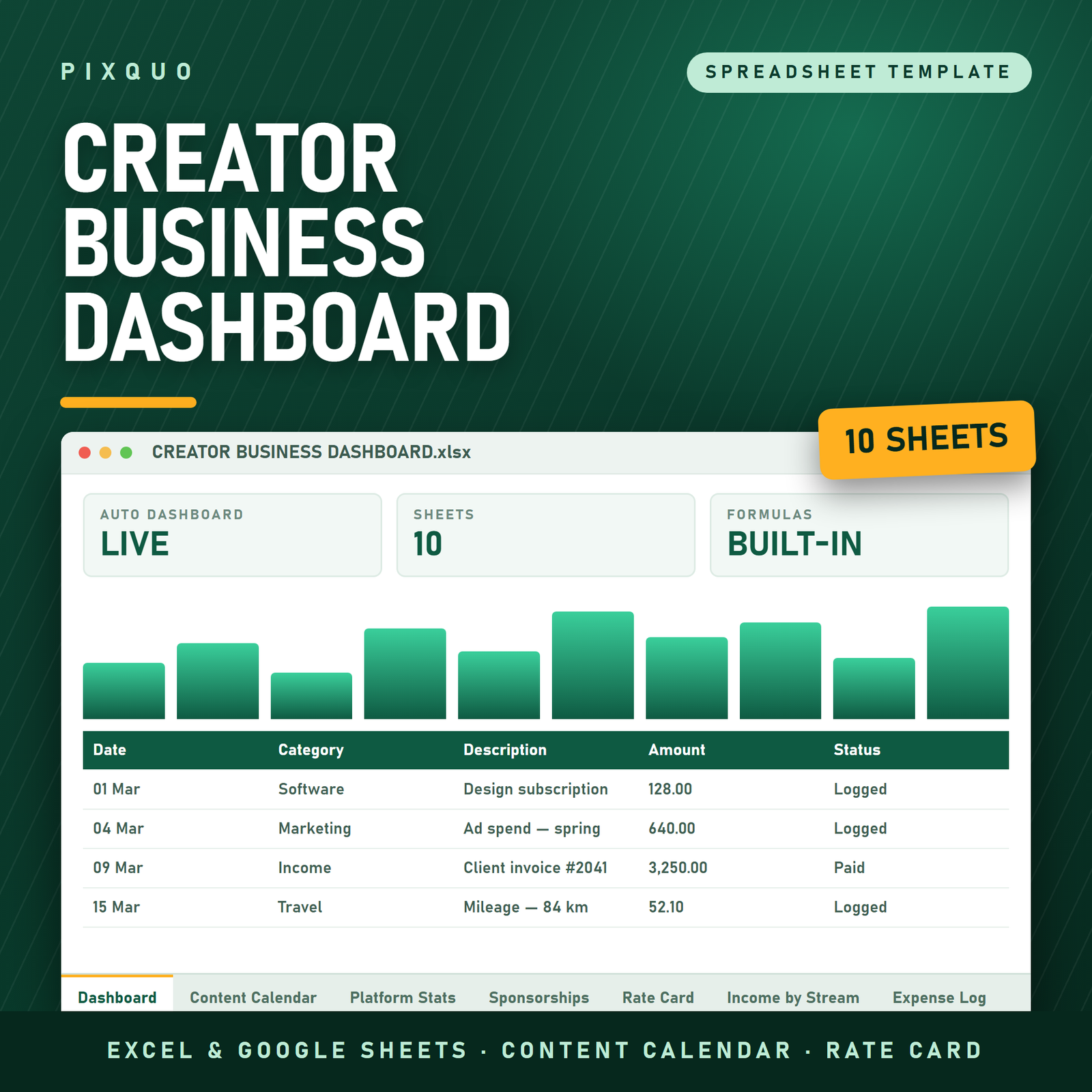
- Creator Business Dashboard — total income, total expenses, net profit, profit margin, sponsorship revenue, money still owed to you by brands, total followers across every platform, posts published, average engagement rate, total views and impressions, progress against your monthly income target, and your best month of the year. Underneath: income broken down by stream and followers broken down by platform, plus a line that names your biggest earner and your biggest cost. Nothing is typed twice.
- Content Calendar — planned date, title or hook, platform, format (long-form, short/reel, carousel, static, story, livestream, newsletter, blog, podcast, UGC ad), content pillar, status from Idea through Scripted, Filmed, Editing, Scheduled, Published and Repurposed, the published date, the link, and what you repurposed it into. 300 rows with filters, so you can see everything that is stuck in Editing in one click.
- Platform Stats — one row per platform per month (or per week, your call): followers, posts, views or impressions, likes, comments, shares and saves. Engagement rate calculates itself. This is the tab that shows you which platform is actually growing and which one is just loud.
- Sponsorships — every brand deal from first pitch to paid: brand, contact, platform, deliverables, agreed fee, status (Pitched, Negotiating, Booked, In Production, Delivered, Invoiced, Paid, Declined), content due date, invoice sent date, paid date, usage rights, notes, and an automatic Balance Due so you always know exactly who still owes you money.
- Rate Card Builder — for each platform it pulls your latest follower count and your average views, then builds a defensible base rate from the CPM you set, adds a usage-rights uplift for whitelisting and paid media, and calculates a three-post bundle rate with a multi-post discount. Then leaves a column for your own rate once you know what your market pays. No more inventing a number in a reply email at 11pm.
- Income by Stream — every payment tagged Sponsorship, Ad Revenue, Affiliate, Digital Products, Coaching, UGC, Merch, Licensing, Memberships, Tips or Other, with the source and platform. This is how you find out that the stream taking 60% of your time earns 8% of your money.
- Expense Log — equipment, software, editing and VA costs, props and wardrobe, advertising, travel, home studio, music and stock, education, platform fees, internet and phone. With a Deductible flag for tax time.
- Monthly Summary — twelve months of income, expenses, net, posts published, sponsorship revenue, views and percentage of target, plus a full-year row. Built entirely from the dates you already entered.
- Settings — currency symbol, your name, tracking year, monthly income target, rate-card CPM and usage-rights uplift.
- Instructions — Excel and Google Sheets setup, what every tab does, how to clear the sample data without breaking anything, and the licence in plain English.
Who this is for
YouTubers, TikTokers, Instagram creators, newsletter writers, podcasters, bloggers, UGC creators and anyone with a Linktree and an invoice to send. Whether you are at 2,000 followers negotiating your first gifted collaboration or at 200,000 juggling six deals a month, the structure is the same — you just fill in bigger numbers.
It is especially useful the moment you start earning from more than one place. One sponsorship plus ad revenue plus a couple of affiliate links is already too many moving parts to hold in your head, and far too messy to hand to an accountant as a screenshot folder.
How to use it
- Open Settings: currency, your name, tracking year, monthly income target, your rate-card CPM and your usage-rights uplift.
- Clear the sample rows from the five log tabs — the Instructions tab shows you exactly how.
- Plan content on the Content Calendar and move the Status along as it goes out. Fill the Published date; that is what the counts read.
- Once a month, add one row per platform to Platform Stats. The Rate Card and the whole Dashboard update from it.
- Log every payment on Income by Stream and every cost on the Expense Log. Track brand deals on Sponsorships from the first pitch through to the money landing.
Formats and compatibility
You receive a single .xlsx workbook in a zip, plus a plain-text quick-start and licence file. It opens natively in Microsoft Excel (Windows, Mac, Microsoft 365, Excel 2016 and later) and uploads straight into Google Sheets for free — formulas, dropdowns, frozen headers and filters all carry across, which matters if you want to check your deal pipeline from your phone. It also opens in Apple Numbers and LibreOffice Calc. No install, no subscription, no account.
Pairs well with
- Content Creator Pro Bundle — Templates, Planner & 900+ AI Prompts — the content side to go with this business side.
- Side Hustle Income & Expense Tracker — a simpler income and expense log if content is one of several things you do.
- Content Creator & Social Media Planner — the printable planning companion.
Reading first? See our guides on digital product side hustles and planners and productivity.
Questions people ask before buying
Do I need Excel?
No. Google Sheets is free and opens the file completely — upload it to Drive, right-click, Open with Google Sheets, then File > Save as Google Sheets. Everything works, including the dropdowns and the rate card.
How does the rate card actually calculate a price?
It takes your latest follower count or your average views for that platform, whichever is higher, divides by a thousand, and multiplies by the CPM you set on the Settings tab. Usage rights add your chosen uplift on top, and a three-post bundle applies a 15% multi-post discount. It is a starting number built from your own reach, not a guess — and there is a column to type your real rate over it once the market tells you what you are worth.
Does it connect to YouTube or Instagram automatically?
No, and that is deliberate. It is a plain spreadsheet with no scripts, no add-ons and no permissions to grant. You enter your monthly numbers by hand, which takes about five minutes and means the file keeps working forever regardless of what any platform does to its API.
Will it work in my currency?
Yes. One cell on the Settings tab sets the currency symbol for the whole dashboard, and there are no country-specific assumptions anywhere in the file.
I am small. Is this overkill?
The opposite. Starting the habit at 2,000 followers means that by the time brands are emailing you, you already have twelve months of engagement data to justify your rate — which is exactly the evidence that turns a 300 offer into an 800 one.
Is this tax or financial advice?
No. It is an organising and calculation tool. The Deductible flag helps you keep clean records for whoever does your return; it does not decide what is claimable in your country. Speak to a qualified accountant about your own situation.
Instant download and licence
Digital product. Your download link is available immediately after checkout, with no expiry and no download limit. Nothing is shipped.
Licensed for personal and single-business use — yours, on as many of your own devices as you like. You may not resell, redistribute, share, sublicense or repackage the file or its contents. Because the file is delivered instantly and cannot be returned, all sales are final.
Microsoft Excel, Google Sheets, YouTube, Instagram and TikTok are trademarks of their respective owners. This product is independent and is not affiliated with, endorsed by or sponsored by any of them; those names are used only to describe the software and platforms the template is designed to work with.
Explore More Digital Tools
- Browse the full shop — planners, trackers, prompt packs and printables
- Free printables library
- Budgeting & saving guide · Planners & productivity guide
- Paper sizes & currency by country
Every Pixquo product is an instant download — no shipping, no waiting.

Reviews
There are no reviews yet.