
Description
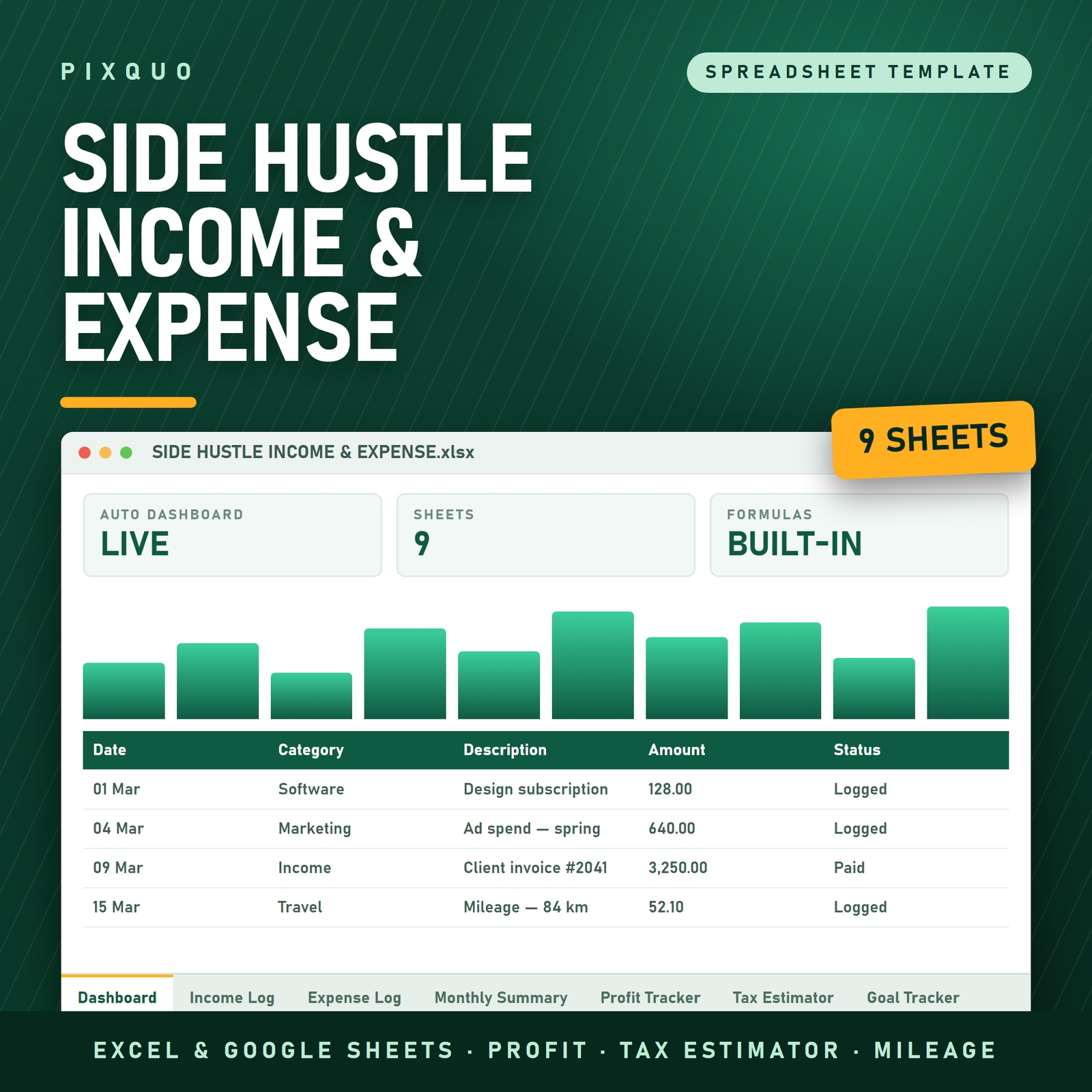
Track every side-hustle dollar in one place. Log income and expenses, see profit at a glance, and stay ready for tax time with an auto-calculating dashboard. Perfect for freelancers, Etsy sellers, and creators. Works in Excel and Google Sheets. Instant download.
Here’s the uncomfortable question every side hustler eventually faces: is this thing actually making money? Not “did payments arrive” — payments always feel like profit in the moment — but truly making money, after the platform fees, the software subscriptions, the materials, the shipping, the ads. Plenty of busy side hustles are, on inspection, expensive hobbies; plenty of modest ones are quietly excellent businesses. The only way to know which one you’re running is to track both sides of the ledger in the same place — and that’s precisely what this spreadsheet does, with an auto-calculating dashboard that turns your entries into the one number that matters: real profit.
Why side hustles need their own tracker
Side-hustle money is uniquely easy to lose track of, because it flows through personal accounts alongside groceries and rent. A client payment lands in the same checking account as your salary; a materials order sits on the same card as the pizza. Mix the streams and two bad things happen. First, you lose sight of profitability — revenue is visible, costs are scattered, and the difference between them (what Investopedia defines as net income — what’s left after expenses) becomes pure guesswork. Second, tax season becomes archaeology: self-employed and side-gig income generally needs to be reported, and being self-employed — even part-time — means the record-keeping is on you, not an employer.
A dedicated tracker solves both with one habit: every hustle transaction, income or expense, gets a row. Thirty seconds at the time of the transaction — or a ten-minute batch on Sunday — and you permanently know your revenue, your costs, and your margin, with a clean record ready for whoever prepares your taxes.
What’s inside the tracker
Income log: every dollar in, with its story
One row per payment: date, source or client, description, and amount. Over time this log becomes surprisingly strategic — it shows which clients, products, or platforms actually generate your revenue, which months run hot or cold, and whether that “small” recurring client is quietly your most valuable relationship. Freelancers with multiple clients, sellers on multiple marketplaces, and creators with several income streams (ads, sponsorships, digital products) can see every stream side by side instead of scattered across five different platform dashboards.
Expense log: the side of the ledger that saves you money
Every cost gets a row too: date, what it was, category, amount. Software subscriptions, platform and payment fees, materials and supplies, shipping, advertising, equipment — the real cost of doing business that memory systematically underestimates. Categorized expense records matter twice over: during the year they reveal where your money actually goes (fees and software are the classic silent profit-eaters), and at tax time an organized expense list is exactly what you or your tax preparer needs, since legitimate business expenses generally reduce the profit you’re taxed on. The tracker keeps the record; your tax professional or local tax authority tells you what qualifies where you live.
Profit at a glance: the auto-calculating dashboard
The dashboard reads your two logs and does the math continuously: total income, total expenses, and profit — the number that answers the uncomfortable question from the top of this page. No formulas to write, no month-end assembly required; log your transactions and the summary is simply always current. This is the tab that turns record-keeping from a chore into a scoreboard. Watching real profit tick upward after a good month is a genuine motivator, and spotting a month where expenses ate the margin is the earliest possible warning that something needs adjusting — a price, a platform, a subscription you forgot you had.
Tax-time readiness, built in from day one
When tax season arrives, everything is already in one place: dated income records, dated and categorized expenses, and totals that are trivially easy to hand to a tax preparer or transfer into your tax software. Compare that to the alternative — reconstructing a year of hustle finances from bank statements, marketplace exports, and inbox receipts in a panicked March weekend — and this spreadsheet pays for itself on record-keeping alone. (To be clear: this is a bookkeeping tool, not tax advice. Rules differ by country and situation, so confirm specifics with your local tax authority or a professional.)
Five margin killers the dashboard exposes
- Platform and payment fees. Marketplace commissions, listing fees, and payment processing each take their slice quietly. Individually they’re “just a percentage”; logged and totaled, they’re often a side hustle’s single largest expense category — and the strongest argument for revisiting prices or channels.
- Software subscription stack. The design tool, the scheduler, the stock library, the email service — each justified on its own, collectively a fixed monthly drag that must be earned back before you make your first dollar of profit each month.
- Underpriced work. When you can see the hours-adjacent costs of a project or product next to what it earned, chronic underpricing stops being deniable. This is the data that finally makes raising prices feel justified rather than scary — our pricing guide picks up exactly where the tracker’s numbers leave off.
- Ad spend without a return check. Advertising is the easiest expense to start and the easiest to never evaluate. A month where ad costs rose and profit didn’t is a pattern the dashboard surfaces in one glance.
- The “small stuff” category. Shipping supplies, sample orders, one-off tools, that gadget that was definitely for the business. Small entries, logged honestly, frequently add up to a startling annual total — and simply seeing it is usually enough to shrink it.
A month in the life with the tracker
Week one: two client payments land and get logged from your phone in under a minute total. The materials order for a new product batch goes in the expense log the evening it’s placed. Week two: a marketplace payout arrives — you log the net amount and the fees as separate entries, because seeing fees explicitly is half the tracker’s value. The monthly software subscriptions hit and take thirty seconds to record since they’re the same every month.
Week three is quiet — nothing to log is also information. Week four: a sponsorship payment, a shipping supplies restock, and your Sunday batch session catches the two coffees that were actually client meetings. Then the month-end ritual, which takes five minutes: open the dashboard, read three numbers. Income: solid. Expenses: higher than usual — the materials batch. Profit: still positive, and you know exactly why it’s thinner than last month, and that next month should be fatter when the new batch starts selling. That’s the entire overhead of always knowing where your hustle stands: a handful of thirty-second entries and one five-minute review.
Compare that to the common alternative — checking the bank balance, feeling vaguely good or vaguely worried, and finding out the truth once a year during tax season. The tracker replaces vague feelings with three numbers you can act on, twelve times a year.
Who this tracker is for
- Freelancers — writers, designers, developers, VAs — juggling several clients and invoices who need income and costs in one honest view. (Pair it with our freelancer invoice tracking guide.)
- Etsy and marketplace sellers whose platform dashboards show sales but hide the full expense picture — fees, materials, shipping, ads — that determines actual margin.
- Content creators stacking ad revenue, sponsorships, affiliate income, and digital product sales across platforms.
- Digital product sellers — if you sell printables, templates, or ebooks, this tracker shows whether your shop’s margins match your hopes. (Thinking of starting? See how to sell printables.)
- Anyone testing a business idea who wants to know, with numbers instead of vibes, whether the experiment deserves more of their time.
It’s built for the one-person operation. If you’ve grown to the point of staff, inventory systems, and formal accounting requirements, you’ll eventually graduate to dedicated software — but for the season of life where the hustle shares a laptop with everything else, this is the right-sized tool.
How to use it: a workflow that survives busy weeks
- Open it in Excel or Google Sheets. Google Sheets is the popular choice here — it means you can log a sale from your phone thirty seconds after the notification arrives.
- Backfill the current year. Pull your payment platform history and bank statements and enter what’s happened so far. An hour of setup buys a complete year-to-date picture.
- Log as you go — or batch weekly. Either rhythm works; the failure mode is “I’ll do it monthly,” which becomes never. A ten-minute Sunday batch session is the sweet spot for most.
- Check the dashboard monthly. Revenue up but profit flat? Expenses are creeping. One client is 80% of income? That’s a risk worth knowing about. The dashboard makes these patterns visible while they’re still cheap to fix.
- Export or share at tax time. Hand the file (or its totals) to your preparer and enjoy being their favorite client.
One habit multiplies the tracker’s value: give the hustle its own bank account or card if you can. Every transaction on that account belongs in the tracker, which makes logging mechanical and reconciliation trivial.
And a note on consistency, because it’s the difference between a tracker and a graveyard of good intentions: the system survives on lowered stakes, not heroic discipline. A missed week isn’t failure — it’s fifteen minutes of catch-up with your statement open. An estimated amount now beats a perfect amount never; you can correct it later. The spreadsheet doesn’t judge gaps, and neither should you. Side hustlers who keep their tracker alive for years all describe the same arrangement: make the entries stupidly easy, batch the cleanup, and let the monthly dashboard check be the one non-negotiable. Everything else is allowed to be imperfect.
Three questions your numbers should be able to answer
A side hustle graduates from hobby to business the day its owner can answer three questions with numbers instead of feelings. One: what did I actually earn last month, after costs? Not revenue — profit. The dashboard answers this permanently. Two: what does it cost me to operate for a month, even if I sell nothing? That’s your fixed expense base — subscriptions, memberships, recurring fees — and your expense log’s recurring entries reveal it within a month or two of tracking. Three: which part of the hustle earns best? When income entries carry their source, the answer emerges on its own: the client who pays promptly and generously, the product line with real margin, the platform whose fees eat everything.
These answers compound. Knowing your monthly cost base tells you your break-even. Knowing your best earner tells you where the next hour of effort should go. Knowing true profit tells you whether the hustle is funding your goals or just funding its own existence. Every one of those insights comes from the same humble habit this spreadsheet makes easy: log the money, both directions, every time.
Tracker vs. accounting software vs. shoebox of receipts
| Receipts & memory | This tracker | Full accounting software | |
|---|---|---|---|
| Cost | Free (until tax season) | One-time, a few dollars | Monthly subscription |
| Setup time | None | Under an hour | Hours + learning curve |
| Shows true profit | No | Yes — auto-calculated | Yes |
| Tax-time readiness | Painful reconstruction | Organized logs, ready to hand over | Reports + exports |
| Right-sized for | Nobody, honestly | Solo side hustles & freelancers | Established businesses |
Compatibility and currency
The file works in Microsoft Excel and Google Sheets, with formulas compatible in both, and opens in LibreOffice Calc as well. Amounts are plain numbers in your own currency — the tracker works identically for a freelancer in London, a seller in Cape Town, or a creator in Toronto. Keep it on your desktop, in your cloud drive, or shared with a business partner; it’s your file, forever, with no subscription meter running. If printables and planners are part of your product line or your personal system, our printables and planners by country hub covers regional formats and paper sizes.
Pairs well with
- Business Financial Dashboard & Profit-Loss Tracker — the step-up file for when the side hustle starts looking suspiciously like a business.
- Small Business Planner Printable — goals, marketing plan, and income tracking on paper, alongside the spreadsheet’s hard numbers.
- Personal Net Worth & Financial Goals Tracker — watch hustle profits show up where they ultimately matter: your net worth line.
Learn more
Growing the hustle itself? Read our guides on pricing digital products and digital product ideas worth building — and if invoicing is part of your world, the freelancer invoice tracking guide completes the money loop from “work delivered” to “payment logged.”
Frequently asked questions
Does it work in Google Sheets and Excel?
Yes — both, fully. Every formula is compatible with Excel and Google Sheets, and the file opens in LibreOffice Calc too. Most side hustlers keep it in Google Sheets for phone access: logging a sale or an expense the moment it happens is the habit that keeps the tracker accurate.
Can I track more than one side hustle in it?
Yes. The simplest approach is one copy of the file per hustle — it’s your file, so duplicate it freely for your own use. Alternatively, use the category or source column to tag entries by hustle within one file and read the logs side by side. Separate copies keep the dashboards cleaner; one file keeps everything in a single place. Both work.
Will this do my taxes for me?
No — and be wary of any spreadsheet that claims to. What it does is keep the organized, dated, categorized records that make tax filing dramatically easier, whether you file yourself or hand everything to a preparer. Tax rules for side income vary by country and situation, so confirm the specifics with your local tax authority or a professional.
I’m just starting and have almost no transactions. Too early for this?
It’s the perfect time. Starting the tracker with your first sale means your records are complete from day one — no backfilling, no forgotten expenses from the messy early months. It also means you’ll know your real margin from the very beginning, which shapes better pricing decisions while your prices are still easy to change.
What’s the difference between this and the Business Financial Dashboard?
This tracker is deliberately lean: income, expenses, profit, done — right-sized for a solo hustle. The Business Financial Dashboard is the bigger sibling for operations that need fuller profit-and-loss structure. Start here; upgrade when your hustle demands it.
What do I receive after purchase?
An instant digital download of the spreadsheet file — nothing ships. Download links appear right after checkout and in your confirmation email, and you can re-download any time from your account.
Instant download & license
This is a digital product with instant delivery and a personal-use license: use it for your own hustle (or hustles) on any of your devices, but please don’t resell, redistribute, or share the file publicly. Sales on instant digital downloads are final; if anything doesn’t work as described, contact us and we’ll make it right.
Explore More Digital Tools
- Browse the full shop — planners, trackers, prompt packs and printables
- Free printables library
- Budgeting & saving guide · Planners & productivity guide
- Paper sizes & currency by country
Every Pixquo product is an instant download — no shipping, no waiting.

Reviews
There are no reviews yet.