
Description
Homeschooling is two jobs at once. There is the teaching, which is the reason you started. Then there is the paperwork, which nobody mentions until somebody asks how many days you have taught this year, or whether you can produce a transcript for a fifteen-year-old whose entire education has lived in your head and on the back of envelopes.
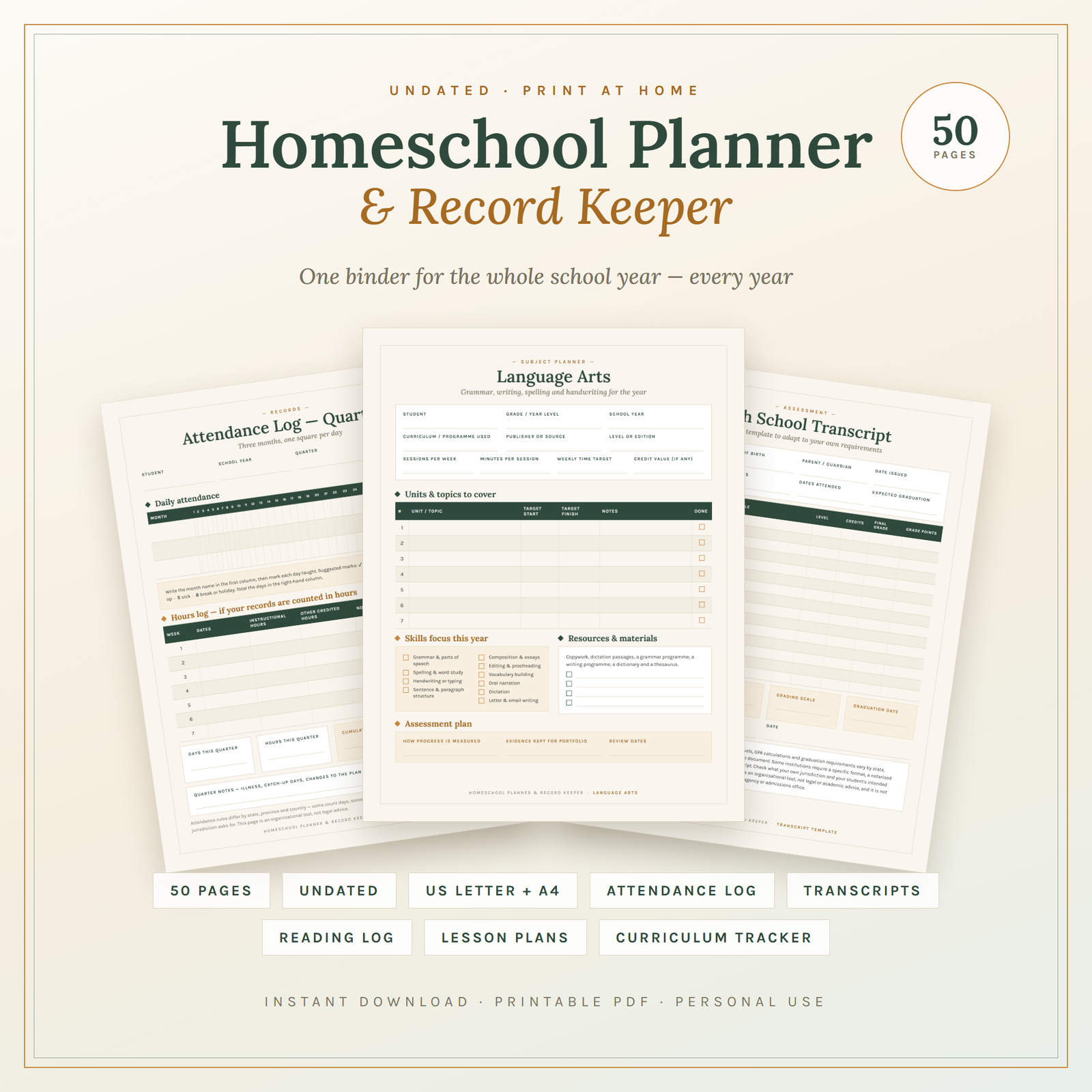
Most homeschool parents keep records in three places at once: a wall calendar, a notes app, and memory. That works until June, when you sit down to write a progress report and cannot remember whether the science unit finished in February or quietly stopped. This is a fifty-page binder that holds all of it in one place, undated, so the same set works this school year and every year after it.
What’s inside
Pages 1–4: setting up. A designed cover, a welcome page with printing instructions and the personal-use licence, a how-to-use page that splits the binder into six tabbed sections, and Homeschool at a Glance — family details, school year dates, your approach, and a ten-item prompt checklist for writing down the record-keeping requirements that apply where you live, with fields for the source you checked and the date you checked it.
Pages 5–8: the year. Year at a Glance gives twelve blank month boxes, so you can start in August, September or January. The Academic Year Calendar counts what you really have: term dates, teaching weeks, days planned, holidays, fixed dates to work around, and totals for days required and buffer days left. Two Term Overview pages break the year down subject by subject, with units to cover, sessions per week and how each will be assessed.
Pages 9–12: your students. Two Student Profile pages and two Yearly Goals pages, one per child. The profile covers grade level, hours per day, best working time, a checklist of how that child actually learns, strengths, support needs and any accommodations in place. The goals page splits into academic goals by subject with a “how we will know it is met” column, life skills, character habits, and the child’s own goals in the child’s own words.
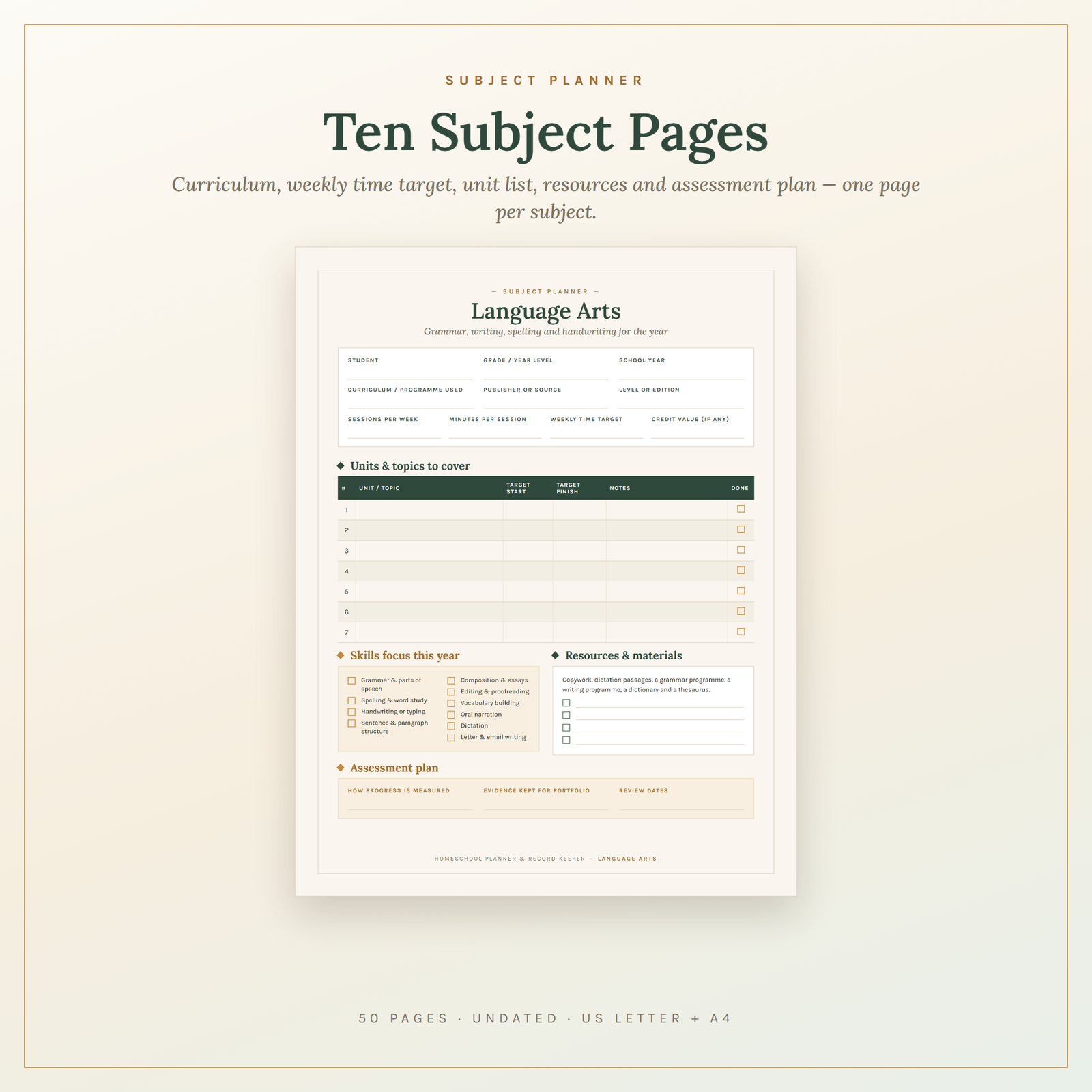
Pages 13–22: ten subject planners. One page each for Language Arts, Reading & Literature, Maths, Science, History & Social Studies, Geography, Art, Music, PE & Health, and Foreign Language or Elective. Each carries curriculum, publisher, level, sessions per week, minutes per session, weekly time target and credit value; a seven-row unit table with target start and finish dates; a subject-specific skills checklist (Language Arts lists grammar, spelling, handwriting, composition, editing and narration — Science lists fair testing, life, earth and physical science units, lab safety and the nature journal); a resources block; and an assessment plan.
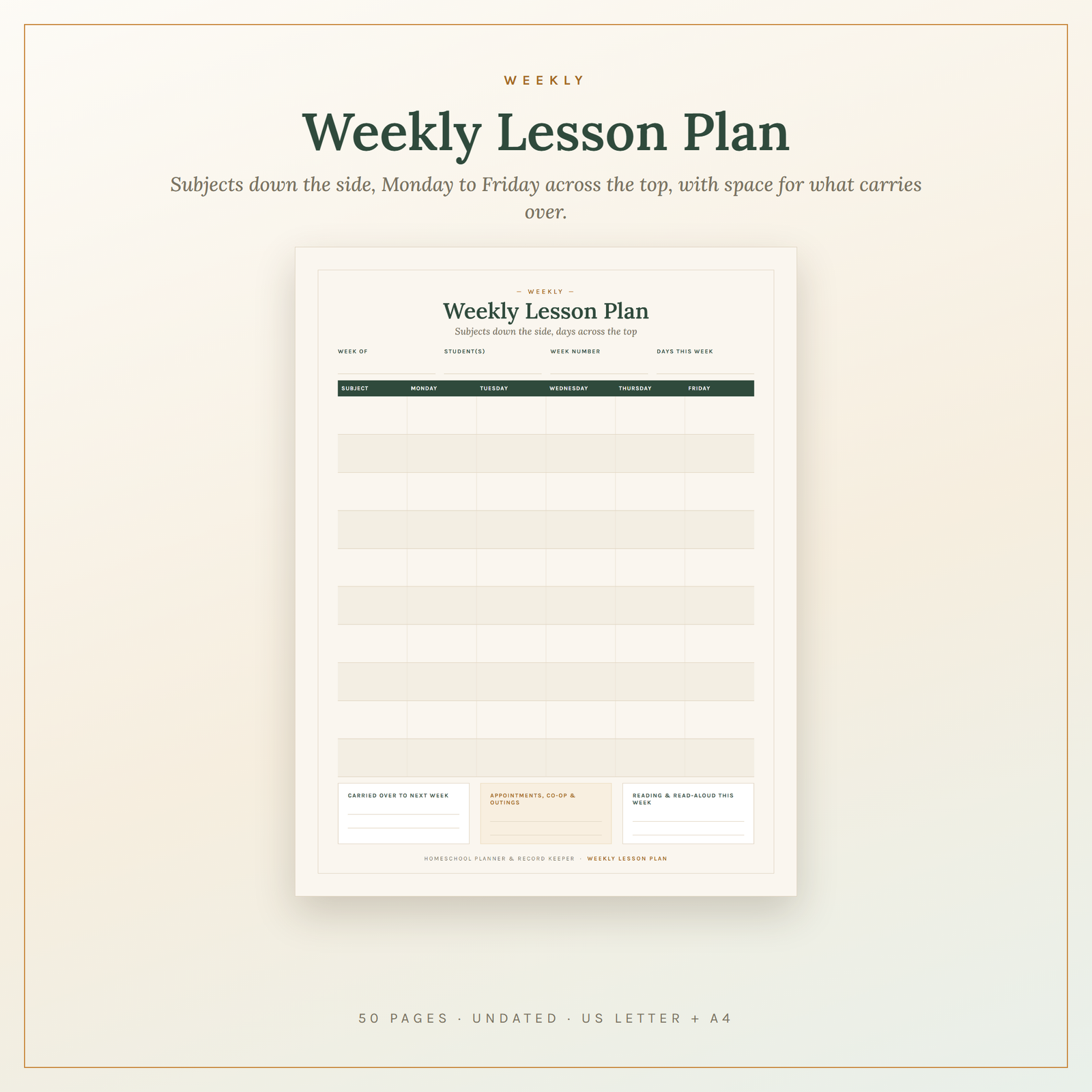
Pages 23–26: the working week. A Weekly Lesson Plan with ten subject rows down the side and Monday to Friday across the top. A Daily Lesson Plan with nine time blocks covering subject, objective, materials and assignment. A Block Schedule page for the shape of an ordinary day, loop subjects and non-negotiables. And a Weekly Review page for Friday: what was covered, wins, obstacles, and one change for next week.
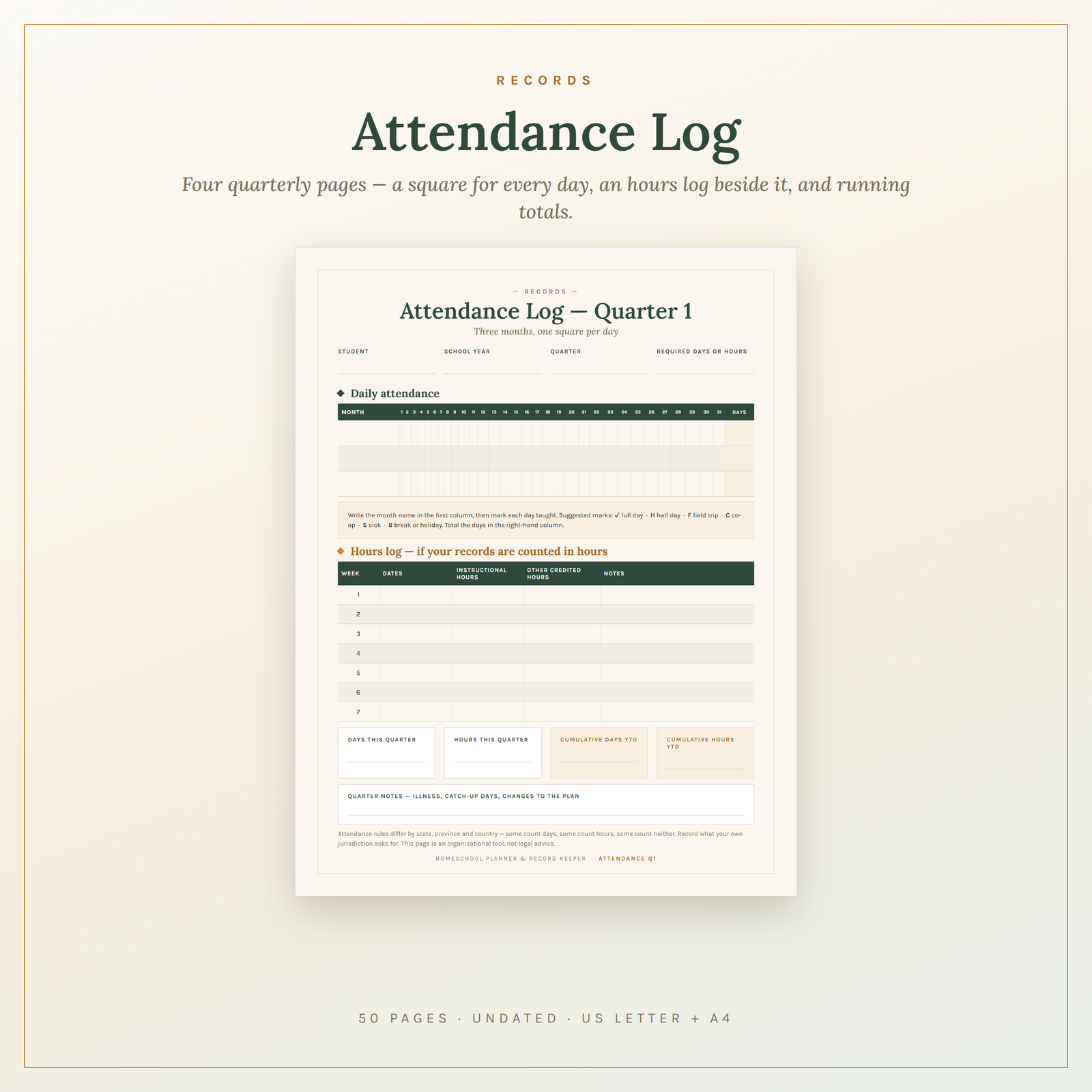
Pages 27–30: attendance. Four quarterly logs. Each has a month-by-day grid — three month rows, thirty-one day columns, a square for every day — with a marking key (full day, half day, field trip, co-op, sick, break), a seven-week hours log for instructional and other credited hours, and four totals boxes: days and hours this quarter, and cumulative days and hours year to date.
Pages 31–38: the records. A Curriculum Tracker logging curriculum, subject, publisher, cost, start and finish dates, percentage complete and a keep/sell/retire column. A Wishlist & Budget page with a ten-category table comparing budgeted against actual. A Supplies Inventory with reorder points. Two sixteen-row Reading Logs — title, author, pages, dates, format, rating, genre — with totals year to date. A Read-Aloud Log. A thirteen-row Field Trip Log with hours, cost and evidence kept, plus a trip planning sheet.
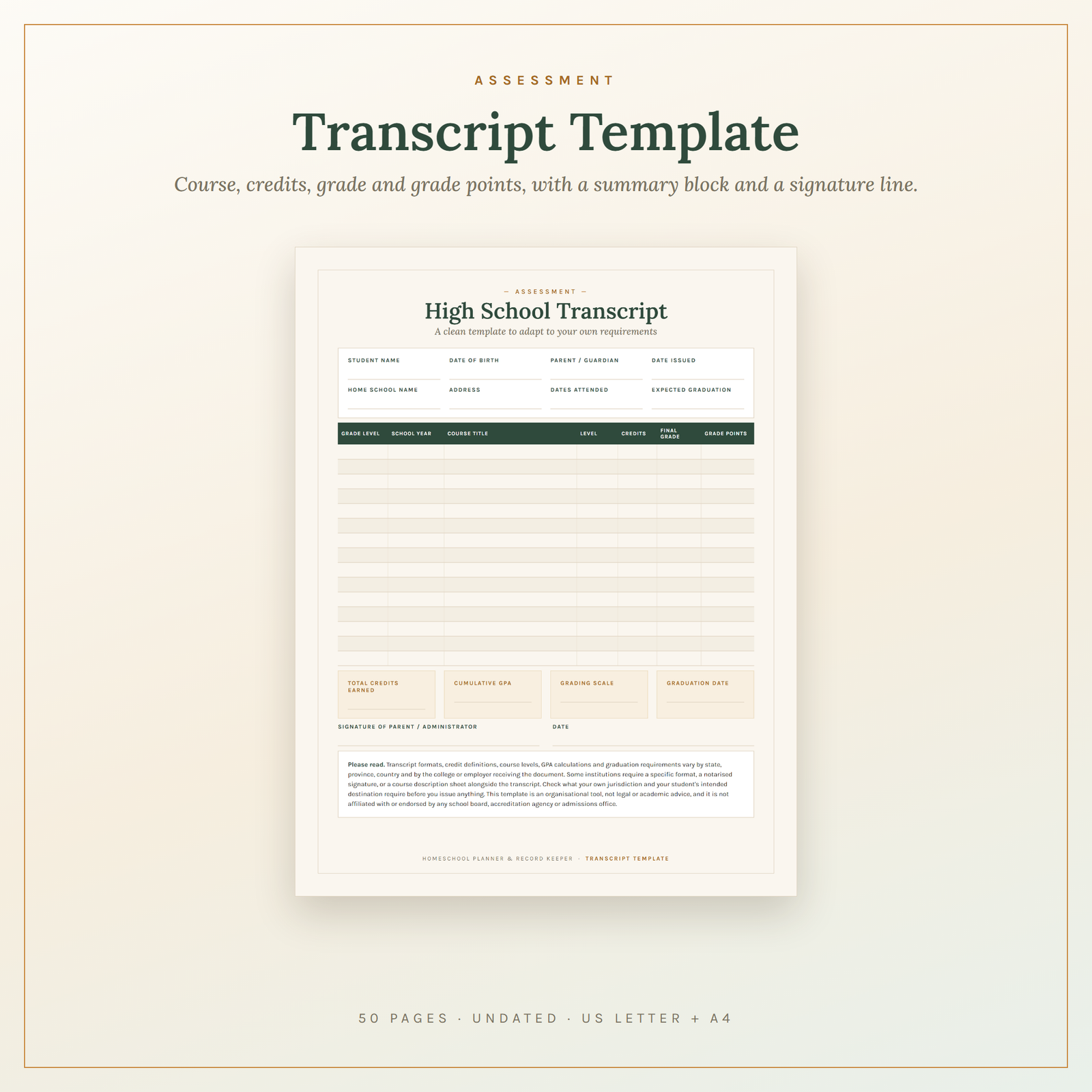
Pages 39–44: assessment and the paper trail. A fifteen-row Portfolio Index so you can find the thing you filed in October. An Assessment & Test Record with score, out-of and percentage columns. A termly Progress Report. A Grades & Credits Tracker with four term columns and a grading-scale block. A High School Transcript template with grade level, course title, level, credits, final grade and grade points, a totals block for credits and cumulative GPA, and a signature line. And a Course Description sheet — the syllabus page that backs up each transcript line.
Pages 45–50: everything else. A Co-op & Extracurricular Tracker, a Volunteer & Service Hours log with a supervisor column built to be initialled on the day, a Login & Subscription Tracker for online curricula with renewal dates and annual totals, a Year-End Summary, a Next-Year Planning page and a lined Notes page.
Who it’s for
The parent in year one who has just filed a notice of intent and has no system yet. The parent in year six whose records are scattered across three notebooks and a phone. The parent teaching two or three children at different levels who needs one binder for all of them. The parent in a state or country that requires attendance days, instructional hours or an annual portfolio review. And the parent of a thirteen-year-old who has just realised that high school records need to start now, not in Grade 12.
Who it is not for: anyone who wants a dated day-per-page diary — this is undated so it reuses every year, but that means you write the dates in. Anyone who wants a planner built for stylus annotation; this is print-first with fixed layouts. And anyone looking for a curriculum: this holds the record of what you teach, it does not tell you what to teach.
How to use it
Print one copy of everything, then extra copies of the weekly plan, daily plan, attendance quarters and reading logs. Punch the pages and add six tab dividers. Fill in Homeschool at a Glance, including the requirements checklist for where you live, then a student profile and a goals page per child. Block out the year on Year at a Glance before you plan a single lesson, because the calendar decides how many teaching weeks you actually have. Fill one subject planner per subject you are genuinely teaching, skip the rest, and start your first weekly plan. That is the whole system running, in under thirty minutes. After that it costs two minutes a day and fifteen on Friday.
Formats and compatibility
You receive one ZIP containing Homeschool-Planner-Record-Keeper-50-Pages-BUNDLE-US-Letter.pdf (all 50 pages, 8.5 x 11 in), Homeschool-Planner-Record-Keeper-50-Pages-BUNDLE-A4.pdf (all 50 pages, 210 x 297 mm), an Individual-Pages folder holding all 50 pages as separate single-page PDFs in both sizes, and READ-ME-FIRST.txt. Both bundles are print-ready vector PDFs that stay sharp at any size and open in Adobe Acrobat Reader, Preview, any browser and every standard tablet reader.
If you want a lighter, single-purpose version rather than the full binder, the Homeschool Year Planner covers the yearly and weekly planning side on its own and works well as a second copy for the co-op bag. For younger children not yet generating written work to record, the Kindergarten Readiness Mega Pack gives you the tracing, phonics and number pages that will eventually fill this binder’s portfolio index. If you also teach outside your own household, the Teacher Lesson & Class Planner Printable is built for a roll of students rather than a family. Two guides worth reading as you set up: Planners & Productivity on building a system you will still use in March, and Habits, Mindset & Motivation for making the Friday review stick.
Is this planner dated? Will I need to buy it again next year?
It is completely undated. Every month box, week field and date column is blank, so you can start in any month and reprint the same files next year and the year after. You buy it once.
Can I edit or type into the pages?
No — these are fixed-layout print PDFs, not fillable forms, and the text is not editable. They are meant to be printed and written on by hand. You can import the PDF into a tablet annotation app and write on it with a stylus, but paper is what the layout was built for.
Will it print properly in black and white?
Yes. Deep forest green and warm ochre on cream were chosen partly because they hold their contrast in greyscale: headers stay dark, shaded rows stay light, every field line stays visible. Switch on “Print backgrounds” or the header bars will not appear.
Does this make me compliant with my state or country’s homeschool law?
No, and no product can promise that. Requirements — attendance days or hours, required subjects, portfolio reviews, testing, notices of intent, transcript formats — vary by state, province and country and change over time. This binder helps you keep records neatly; it is not legal advice. Check the current rules where you live. There is a page specifically for writing your own requirements down.
What if the file will not download or open?
It is a standard ZIP holding standard PDFs. If your device will not unzip it, download on a desktop or laptop rather than a phone, where ZIP handling is patchier. If a file genuinely will not open, contact the shop and it will be sorted out. Because this is an instant digital download, it is non-refundable once delivered.
Delivered as an instant download, available the moment your order completes. Licensed for personal use in one household: print as many copies as you like, for as many school years as you like, for the children you personally teach. Resale, sharing and redistribution are not permitted. This is an independent publication, not affiliated with, endorsed by, or sponsored by any curriculum publisher, school board, examination body, accreditation agency or education authority; any curriculum or publisher name you write on these pages is your own record, used for identification only. Record-keeping requirements vary by jurisdiction and this planner is not legal advice. The budget and subscription pages are organisational tools, not financial or tax advice — consult a qualified professional about your own situation.
Explore More Digital Tools
- Browse the full shop — planners, trackers, prompt packs and printables
- Free printables library
- Budgeting & saving guide · Planners & productivity guide
- Paper sizes & currency by country
Every Pixquo product is an instant download — no shipping, no waiting.
Reviews
There are no reviews yet.