
Description
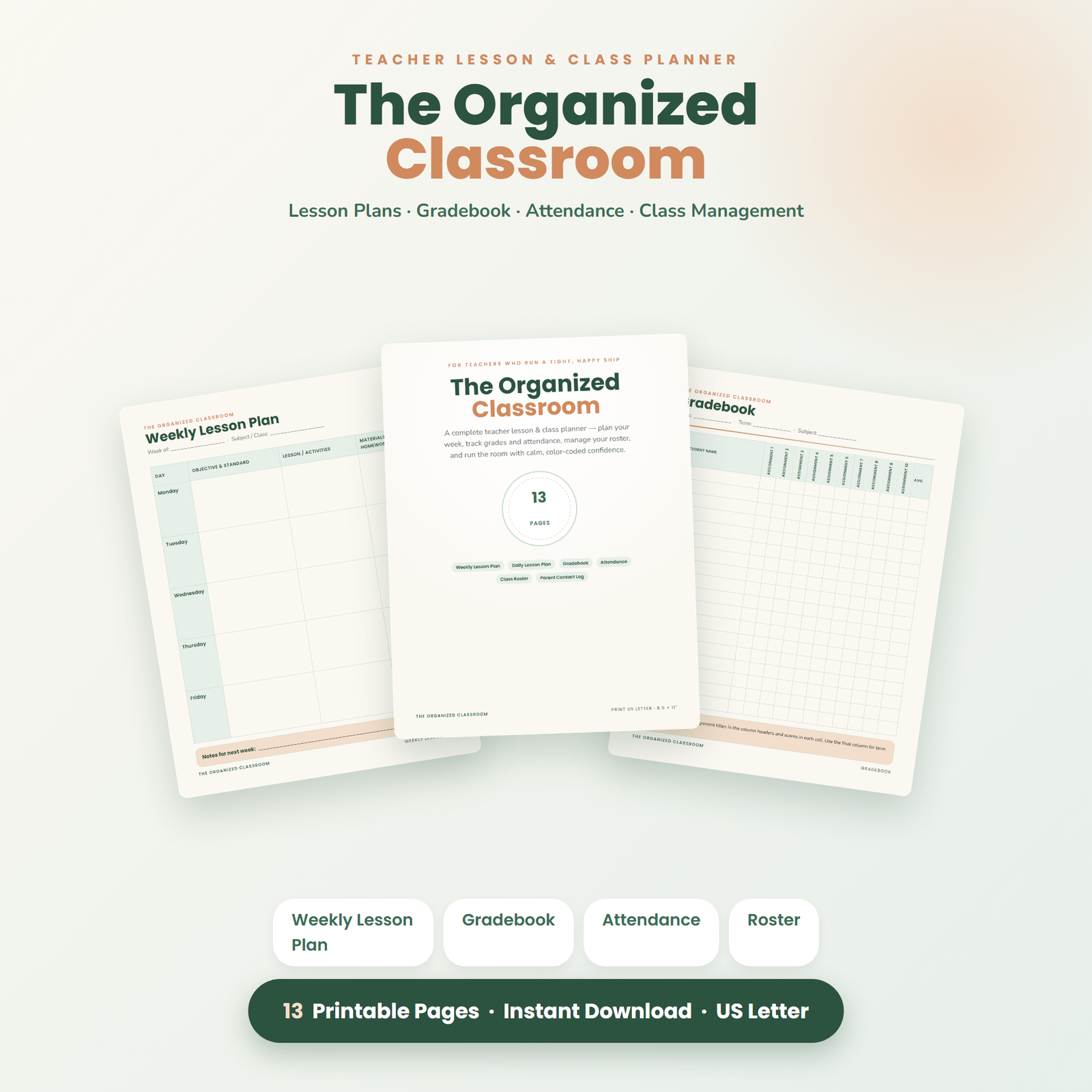
Stay organized all year with The Organized Classroom — a complete 13-page printable Teacher Lesson & Class Planner. Everything you need to plan lessons, track grades and attendance, manage your roster, and run a calm, color-coded classroom.
Teaching is the only profession where you perform live for six hours, then do your actual paperwork afterwards. Lesson plans, grades, attendance, parent phone calls, seating politics, the sub folder you keep meaning to build — none of it is hard on its own, but all of it at once, every week, across a hundred-plus students, is how good teachers end up planning on Sunday nights and grading in the car. The Organized Classroom exists to put the entire administrative side of teaching into one binder with one page for every job. Nothing lives in your head, nothing lives in six different notebooks, and when someone — an administrator, a parent, a substitute — needs information, you open one binder and point.
Why Teachers Keep Coming Back to Paper Planners
School software is built for the school, not for you. Gradebook portals go down during report season, seating apps don’t know that two particular students must never share a table group, and no district platform has ever survived contact with a classroom’s wifi on a Friday afternoon. A paper planner is instant, silent, and entirely yours: open it mid-lesson without a login, annotate it during a fire-drill headcount, hand it to a substitute who has never seen your school’s systems. A well-structured lesson plan is also thinking made visible — the act of writing objectives, activities, and assessments by hand is itself part of preparing to teach, not a chore that follows it. Most teachers we hear from run paper as the daily driver and transfer to the official system in one weekly batch, which turns death-by-a-thousand-logins into a single planning-period task.
What’s Included: All 13 Pages, Explained
Teacher Information & Daily Schedule
Your term at the front of the binder: personal details, timetable, duty rosters, and the bell schedule that governs everything else. This is also the first page a substitute or covering colleague reads — it orients anyone in your room in under a minute.
Weekly Lesson Plan
The workhorse: your full week across all classes on one spread, with space for objectives, activities, and materials per lesson. Planning a week in one sitting reveals the shape of it — the heavy marking days, the lab that needs prep, the gap where a review lesson belongs — before the week can ambush you.
Daily Lesson Plan
For the lessons that deserve detail: starter, objectives, instruction phases, differentiation notes, assessment checks, and homework. Ideal for observed lessons, tricky topics, and any day when you want the flow scripted rather than improvised. Pairing objectives to levels of thinking — recall, application, analysis, creation, in the spirit of Bloom’s taxonomy — is effortless when the page prompts you for it.
Unit & Topic Planner
Zoom out from days to weeks: map a whole unit’s arc — big ideas, lesson sequence, assessments, resources — on one page. Units planned backwards from their assessment teach tighter than units assembled lesson by lesson, and this page makes backwards design the default.
Class Roster
Every class list in one place, with room for the notes that matter: pronunciation reminders, pull-out schedules, accommodations flags. The roster you build in week one quietly powers every other page in the binder.
Seating Chart
A visual room map you can redraw in pencil as often as classroom chemistry demands — which, as every teacher knows, is often. Laminate it and a dry-erase marker turns seating changes into a ten-second job. Also the single most useful page you can leave a substitute.
Gradebook
Clean columns for assignments, assessments, and running records per class. Works with any marking system — percentages, letters, points, standards codes — and never locks you out during report-writing week. Many teachers keep this as the source of truth and batch-enter into the district portal weekly.
Attendance Tracker
Term-at-a-glance attendance per student. Patterns leap off a paper grid in a way scattered digital records never manage — the every-Monday absence, the slow fade that warrants a phone call home — and spotting the pattern early is the whole point.
Parent Contact Log
Date, student, reason, summary, follow-up — every call, email, and meeting documented as it happens. This page is professional self-defense: when a conversation is questioned months later, your contemporaneous log is the record that settles it. It also turns parent-teacher evenings into a review of notes rather than a memory test.
Behavior & Reward Tracker
Consistent, dated notes on behavior — positive and negative — plus reward-system tracking for the classes that run on points, stars, or table competitions. Consistency is what makes any behavior system credible to students, and a tracker is what makes consistency possible for a human teacher with a hundred names to remember.
Substitute Teacher Notes
The page that lets you be sick in peace. Routines, class-by-class notes, where everything lives, which students help and which need watching, emergency procedures. Fill it once in September, update it termly, and the dreaded 6 a.m. sub-plan scramble becomes “it’s in the red binder, page eleven.”
Welcome & How-to-Print Guide, Plus a Cohesive Cover
Printing settings, assembly suggestions, and usage terms on one orientation page — plus a polished cover so the binder on your desk looks like the organized classroom it represents.
Who This Planner Is For
- Classroom teachers, K–12 — primary teachers lean on the behavior, attendance, and parent pages; secondary teachers print roster and gradebook pages per class section.
- New teachers building their first systems — starting with a page for every job beats discovering each need mid-crisis in October.
- Veteran teachers tired of assembling a planner from photocopied fragments of five old ones — this is the coherent version of the system you already invented.
- Homeschool educators — the lesson, unit, and grade pages scale down to a kitchen-table classroom beautifully; see also our dedicated Homeschool Year Planner.
- Tutors, coaches & specialists who teach across sites and need records that travel in a bag, not a browser.
How It Works
- Instant download — one print-ready PDF the moment your order completes. No shipping, no waiting.
- Print what your classroom needs — one roster per class, a weekly plan per week, one sub-notes page per term. Print at 100% / “Fit” on US Letter, portrait.
- Bind it your way — 3-ring binder with tabs per class, a spiral-bound book from the print shop, or a slim clipboard-and-crate system. Your planner, your architecture.
- Laminate the reusables — seating chart, schedule, and reward tracker become dry-erase tools that last all year.
- Reprint forever — new term, new class, new school: print fresh pages as many times as you like for your own classroom.
A Year in the Binder: September to June
September: an afternoon of setup — rosters, schedule, seating charts, and the substitute page while energy is high. October to December: the weekly rhythm settles in; Sunday or Friday planning fills the Weekly Lesson Plan, the gradebook grows, and the parent log quietly earns its keep before the first conferences. January: new term, fresh seating charts, a unit-planning session for the spring. Testing season: the attendance and behavior pages carry the strange weeks; daily plans keep disrupted schedules coherent. June: the binder becomes your year’s archive — evidence for evaluations, a record for report writing, and the template you photocopy your future self a head start from. Teachers who keep a full year’s binder start the next September with every system pre-invented; our teacher lesson planner guide walks the full workflow, and time blocking with buffers is the planning-period survival method every teacher deserves.
The One-Hour Planning Routine
The binder’s real gift is a repeatable weekly routine that caps planning instead of letting it sprawl across your whole weekend. Here’s the hour, minute by minute:
- Minutes 0–10: review. Flip through last week’s Weekly Lesson Plan. What overran? What never got taught? Carry-overs go first into next week — unfinished content doesn’t disappear because the bell rang.
- Minutes 10–35: plan the week. Fill the Weekly Lesson Plan for every class, checking the Unit & Topic Planner so each lesson advances the arc rather than just filling the slot. Note materials that need booking or copying while you still have lead time.
- Minutes 35–45: detail the hard one. Pick the week’s trickiest lesson — new topic, observed class, difficult group — and give it a full Daily Lesson Plan.
- Minutes 45–55: the books. Batch-update gradebook and attendance, and log any parent contact from the week while it’s fresh.
- Minutes 55–60: the sweep. Seating tweaks, behavior notes, and one line on the sub page if anything structural changed. Close the binder. You’re done — actually done.
For New Teachers: Your First-Year Head Start
Nobody warns new teachers that the hardest part of year one isn’t the teaching — it’s inventing, from nothing, all the systems the veterans quietly rely on. How do you track who you called home? Where do sub plans live? What does a unit plan even look like? This planner answers every one of those questions with a page, which means your first year starts with the infrastructure most teachers take three years to accumulate. The Parent Contact Log alone will save you in your first difficult conversation with an administrator; the Substitute Notes page will save you on your first sick day; and the year’s completed binder becomes concrete evidence of your practice when evaluation season arrives. Print it during pre-service week, set it up alongside your classroom, and walk into day one looking — and feeling — like you’ve done this before.
Printable Planner vs. Teacher Planner Books vs. School Software
| The Organized Classroom | Store-bought teacher planner | School software | |
|---|---|---|---|
| Cost | One-time, reprint every year | New book every year | “Free” (your district pays; you suffer) |
| Pages fit your classes | Print any mix, any quantity | Fixed ratio decided by a publisher | N/A |
| Works mid-lesson, offline | Yes | Yes | Depends on wifi and logins |
| Sub can use it instantly | Yes — hand over the binder | Partially | No credentials, no luck |
| Survives a district platform change | Completely | Completely | Start over |
| Seating chart & behavior pages | Included | Rarely | Sometimes, clunky |
Paper Size, Printing & Compatibility
- 13 pages, US Letter (8.5 × 11 in), portrait, high-resolution PDF
- Printing on A4 (UK, Europe, Australia, most of the world): choose “Fit to page” and the layout scales cleanly to ISO 216 A4 — nothing is cut off
- Opens in any free PDF reader; also imports into GoodNotes or Notability for stylus-and-tablet teachers — see our GoodNotes planning guide
- Undated and curriculum-neutral: works for any country, grading system, subject, and school calendar, year after year
- Prints beautifully in full color or in ink-saving grayscale; as with all printables, colors may vary slightly depending on your screen calibration and printer model
Pairs Well With
- Teacher & Homeschool Complete Bundle — this planner plus worksheets and teaching prompts in one discounted set; the best value if you’re building a full toolkit.
- 250 ChatGPT Prompts for Teachers — lesson ideas, differentiation strategies, parent-email drafts, and rubric starters that slot straight into your weekly planning session.
- Sight Words No-Prep Practice Pack — ready-to-print practice pages for early-years classrooms, the teaching content to this planner’s organization.
A Gift Teachers Actually Use
If you’re shopping for a teacher — a colleague, your child’s teacher, a friend starting their first post — skip the eleventh “best teacher ever” mug. Print this set, tab it into a quality binder with a good pen clipped to the front, and you’ve given the rarest kind of teacher gift: one that removes work instead of adding clutter. It lands especially well at three moments — pre-service week in late summer, the January reset, and graduation season for newly qualified teachers heading into their first classroom. The personal-use license covers assembling a printed binder as a gift; sharing the digital file itself isn’t permitted, so gift recipients who fall in love with the system (they will) can pick up their own copy for reprints.
Keep Learning: Guides From the Pixquo Blog
Browse the planners & productivity hub for our complete library of planning systems, or see the best printable planners of 2026 to compare formats. Teaching outside the US? Find localized planner collections via the printables & planners by country hub, including pages for the United Kingdom and North America.
Frequently Asked Questions
Is this planner dated, or can I use it any school year?
Undated — you write in your own dates, so it works for any school year, any hemisphere’s calendar, and any term structure. Buy once, reprint every September (or February) forever.
I teach five different classes. Do I need five planners?
No — you print five rosters, five gradebook pages, and five attendance trackers from the same file, then divide your binder with tabs per class. Per-page printing is exactly why a printable planner beats a bound one for multi-class teachers.
Will it work with my school’s grading and curriculum system?
Yes. Every page uses open fields rather than locked formats: percentages, letter grades, points, standards-based codes, IB, national curricula — if you can write it, the gradebook and planners hold it.
Can I use it digitally on an iPad?
Yes — import the PDF into GoodNotes, Notability, or any annotation app and plan with a stylus. Plenty of teachers run hybrid: seating chart and sub notes printed and pinned, everything else on the tablet.
Can my teaching partner or department use my file?
The license covers your own classroom. Colleagues who’d like their own copy should grab their own download — it keeps the lights on for an independent shop, and we’re grateful every time. (Sharing the printed binder with a substitute covering your class is, of course, exactly what it’s for.)
When do I receive the files?
Instantly after checkout — download links appear on your confirmation page and by email. You could have September’s binder printed and tabbed by tonight.
Instant Download & License
This is a DIGITAL DOWNLOAD — no physical product will be shipped, and files are available immediately after purchase. For personal classroom use only: print as many copies as your own teaching requires, but please do not resell, share, or redistribute the files. All designs are original. Colors may vary slightly by screen and printer. See our refund policy for digital purchases, or contact us with any question — we’re happy to help before or after you buy.
You already run a classroom; you shouldn’t also have to run a filing crisis. Every year you teach without a system, the system you never built costs you evenings, weekends, and energy your students deserve instead. Download The Organized Classroom today, spend one planning period setting it up, and teach the rest of the year out of one calm, color-coded binder — the one your future substitute, your future evaluator, and your future self will all quietly thank you for.
Explore More Digital Tools
- Browse the full shop — planners, trackers, prompt packs and printables
- Free printables library
- Budgeting & saving guide · Planners & productivity guide
- Paper sizes & currency by country
Every Pixquo product is an instant download — no shipping, no waiting.
Reviews
There are no reviews yet.