
Description
Most freelancers do not have a pricing problem. They have an arithmetic problem. They divide the salary they want by 2,080 hours, forget that software, insurance, equipment and their accountant all come out of the same pot, forget that tax takes a bite before they see a penny, and forget that nobody bills eight hours a day. Then they wonder why a “good year” leaves them with nothing.
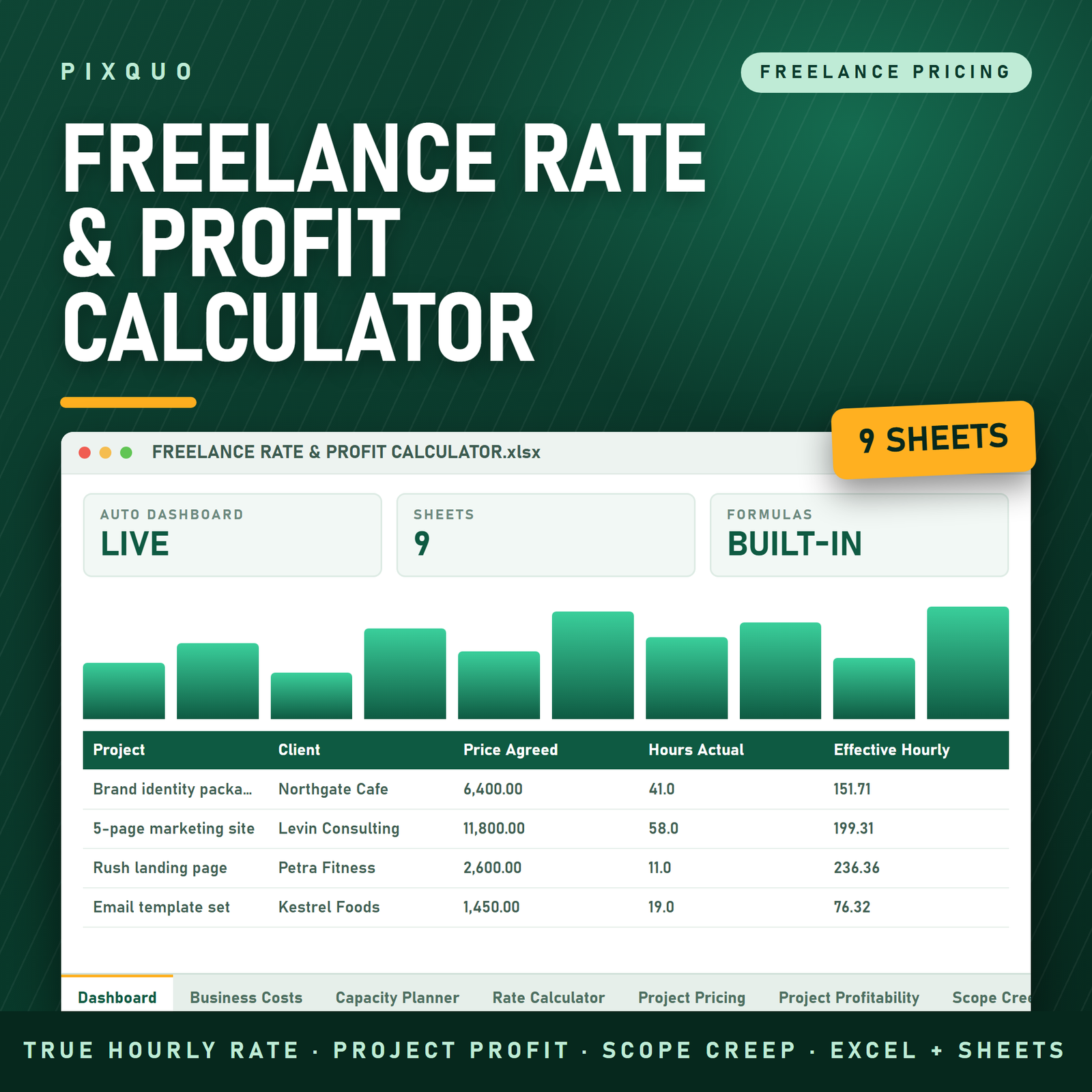
This 9-sheet Excel and Google Sheets workbook fixes that with maths instead of guesswork. It works backwards from the money you actually need to keep, the true cost of running your business, and the hours you can genuinely sell — and gives you a defensible hourly, day and week rate. Then it keeps score: which projects paid that rate, which quietly did not, and how much unbilled scope creep you gave away this year.
What you get — all 9 sheets
1. Dashboard. Read-only and entirely formula-driven, grouped into five bands: your rate, cost of doing business, capacity, projects, scope creep, and pipeline versus target. Around thirty live figures including recommended hourly rate, absolute minimum rate, day rate, week rate, revenue you must invoice per year, business costs per billable hour, billable versus non-billable hours, your real effective hourly across all completed work, how that compares to your target rate, hours over estimate, projects that came in at or below your floor, unbilled scope-creep value, and the rate increase required to hit your income target.
2. Business Costs. Fifty rows for everything you pay for in order to be able to work — software, insurance, equipment replacement funds, workspace, marketing, accountant, training, travel, payment processing fees. Pick a frequency (weekly, monthly, quarterly, six-monthly, annual or one-off) and the annual figure calculates itself, with a category breakdown and bars showing where your overhead actually sits.
3. Capacity Planner. This is the sheet that changes people’s rates. Set your weeks off, working days, hours per day and — honestly — the percentage of desk time a client actually pays for. It returns billable hours per year, month, working week and working day, plus the non-billable hours you will spend on proposals, invoicing, marketing and email. A sensitivity table shows what happens at every billable percentage from 40% to 80%, so you can see exactly how expensive optimism is.
4. Rate Calculator. Enter the take-home pay you need, your tax and contributions set-aside, and a profit and risk buffer. The sheet calculates the gross revenue you must invoice, subtracts nothing it should not, divides by your real billable hours, and returns your absolute minimum hourly rate plus a recommended rate rounded to a number you can say out loud. Day rate and week rate follow automatically, along with monthly and weekly revenue targets. A second table shows the rate you would need if you end up billing 10%, 20% or 30% fewer hours than planned.
5. Project Pricing. Quote the same job two ways before you send anything. Enter estimated hours, a risk uplift for vague briefs and rush work, and any pass-through costs. The sheet produces an hourly quote and a fixed-price quote side by side, then tells you the effective hourly rate the fixed price would actually pay you and which of the two is better for you on that specific job.
6. Project Profitability. The post-mortem, for forty projects. Price agreed, direct costs, hours estimated, hours actually worked, hours over, net revenue, effective hourly, and how far above or below your target rate that lands. A verdict column calls it: Profitable, Thin margin, Below floor, or Loss-making. Totals identify your most and least profitable project and count how many jobs came in under your floor.
7. Scope Creep Tracker. Forty rows for every “quick extra” — what it was, whether it was in the original scope, how many hours it took, whether you billed it, what it was worth at your rate, what you actually recovered and what you gave away. The totals give you a recovery rate and a single number for the year: the value of work you did for free.
8. Income Target Planner. Type the take-home income you want. The sheet back-solves the revenue you must invoice, the number of projects that implies at your average project value, the hours those projects would consume, and whether that fits inside the billable hours you actually have. If it does not, it tells you plainly, and shows both routes out: the hourly rate that would make it work, and the average project value that would make it work instead.
9. Instructions. The order to fill things in (it only works one way round), how the rate maths is derived, what each tab does, how to change currency, how to clear the sample data safely, and the licence.
Who this is for
Freelancers, contractors and solo consultants in any discipline — design, development, writing, photography, video, marketing, bookkeeping, virtual assistance, coaching, translation, architecture. It is equally useful if you are setting your very first rate, if you have not raised your rate in three years and cannot justify why, if you keep taking fixed-price work that feels busy but does not pay, or if you are deciding whether to go full-time freelance and need to know what number makes that survivable. Small studios with one or two people will find the same maths works.
How to use it
Fill it in this order, because each tab feeds the next. Business Costs first — list everything, including the equipment replacement fund you have been ignoring. Capacity Planner second, and be honest about the billable percentage; 50–65% is realistic for a solo freelancer once you count proposals, admin and marketing. Rate Calculator third: enter the take-home you need, your tax set-aside and a buffer, and read your floor.
From then on it runs alongside your work. Price every job on the Project Pricing tab before you send the quote. When a job finishes, log it on Project Profitability with the hours you actually worked, not the hours you meant to work. Record every out-of-scope request on the Scope Creep Tracker the day it lands. Once a quarter, open the Income Target Planner and check whether the year still adds up.
Sample rows are included on every log tab so the dashboard shows live numbers immediately. The Instructions tab explains how to clear them without breaking the totals.
Formats and compatibility
One .xlsx file, delivered in a ZIP. Opens directly in Microsoft Excel on Windows and Mac, and in Google Sheets via Drive → New → File upload → Open with Google Sheets — formulas, dropdowns, frozen headers, conditional formatting and data bars all carry over. It also opens in LibreOffice Calc and Numbers. No macros, no add-ons, no subscription. Input cells are shaded so you always know what is yours to type in and what is calculated. Currency is a formatting choice, so it works anywhere in the world.
Pairs well with
- Freelancer Income & Tax Estimator — once you know your rate, this helps you set aside the right share of every invoice.
- Etsy & Online Seller Profit Calculator — the same margin thinking applied to products rather than hours, if you sell alongside client work.
- 350+ ChatGPT Prompts for Freelancers & Consultants — prompts for writing the proposal, the rate-increase email and the scope-change conversation.
Free reading first
Read our guide on how to price without undercharging before you set your buffer, and how to start a digital product side hustle if you want income that is not tied to hours at all. The full budget and finance spreadsheet collection is here.
How is the recommended rate actually calculated?
Take-home pay divided by (1 minus your tax set-aside) gives the gross you must invoice for yourself. Add your annual business costs. Multiply by (1 plus your buffer) for late payers, rework and quiet months. Divide by your real billable hours per year. That is your minimum; the recommended rate is that number rounded up to the nearest interval you choose. Every step is visible on the sheet — nothing is hidden.
What billable percentage should I use?
Whatever is true for you. The sheet defaults to 60% and the sensitivity table shows the effect of every value from 40% to 80%, so you can test rather than guess. Anything above 75% usually means proposals, invoicing, marketing and email are not being counted anywhere. If your billable hours per day come out above six, the plan probably has no room for admin or for anything going wrong.
Does it tell me what the market will pay?
No, and it does not pretend to. This calculates a floor — the rate below which you are subsidising your own clients. What the market will bear is a separate question you answer with research and positioning. Check the floor first, then price on the value and the risk of the specific work.
Can I use it for fixed-price and retainer work, not just hourly?
Yes — that is largely the point. The Project Pricing tab quotes hourly and fixed-price side by side and shows the effective hourly a fixed price would really pay. The Rate Calculator produces a day rate and a full week rate for retainers, and the Project Profitability tab measures every job against your target rate no matter how it was billed.
Will it handle my country’s tax rules?
It uses one set-aside percentage that you control, so it adapts to any country — but it does not model tax brackets, deductions, VAT or social contributions for you. Put your own combined rate in that cell. Your accountant can tell you what it should be in about two minutes.
Instant download & licence
This is a digital download — available immediately after checkout, with unlimited re-downloads and no expiry. Licensed for use by you in your own freelance business, on as many of your own devices as you like. You may not resell, redistribute, share or repackage the file or its contents.
Not financial advice. This workbook is a pricing and record-keeping tool only. It is not financial, tax, accounting or legal advice, and it does not guarantee any income, rate, client or result. Every figure it produces is arithmetic performed on the numbers you type in. Tax and contribution rules differ by country — speak to a qualified accountant about your own situation.
Microsoft Excel is a trademark of Microsoft Corporation and Google Sheets is a trademark of Google LLC. This product is independent and is not affiliated with, endorsed by or sponsored by Microsoft or Google; those names are used descriptively only, to tell you where the file opens.
Explore More Digital Tools
- Browse the full shop — planners, trackers, prompt packs and printables
- Free printables library
- Budgeting & saving guide · Planners & productivity guide
- Paper sizes & currency by country
Every Pixquo product is an instant download — no shipping, no waiting.
Reviews
There are no reviews yet.