
Description
Most teachers who try AI give up in week two — not because the tool is bad, but because “write me a lesson plan” gets you something generic you then have to rewrite from scratch. The difference between a useless answer and a usable one is the prompt: the grade level, the topic, the class size, the time you actually have, the constraints of your room, and the exact format you want back.
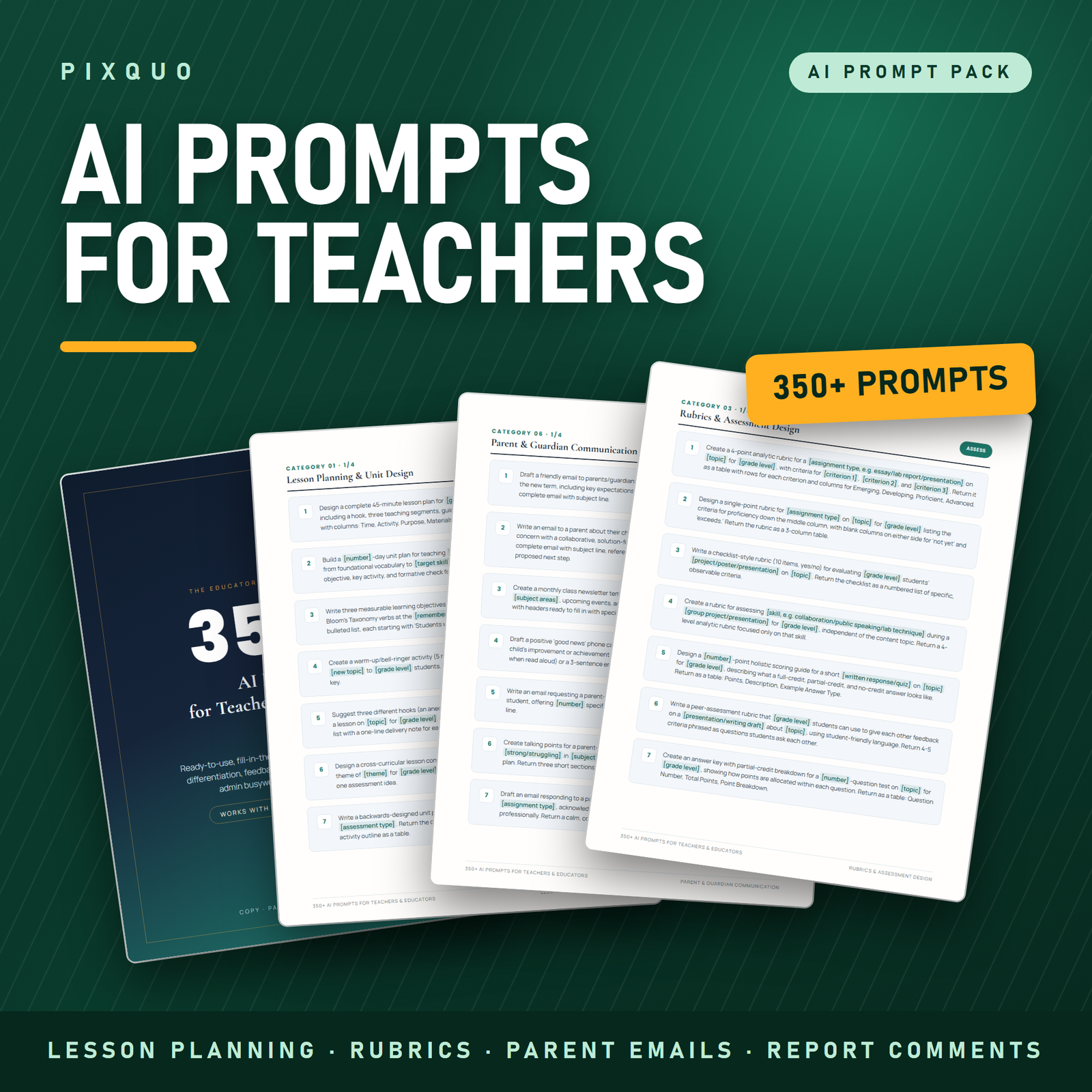
This pack is 350 fill-in-the-blank prompts written that way. Every one has bracketed variables you swap for your own details and a stated output format, so what comes back is something you can actually put in front of a class after a read-through rather than a rebuild.
What is inside — 14 categories, 25 prompts each
- Lesson Planning & Unit Design — single lessons, multi-week units, learning objectives, sequencing, hooks, plenaries and lesson structures built around the time you actually have.
- Differentiation & Scaffolding — the same task at three entry points, tiered questioning, sentence stems, scaffolded worked examples and extension work for students who finish early.
- Rubrics & Assessment Design — analytic and holistic rubrics, criteria wording that students can actually read, exit tickets, low-stakes checks and end-of-unit assessments.
- Feedback & Marking Comments — specific, actionable comment banks, whole-class feedback summaries, and turning a pile of scripts into three teaching points for the next lesson.
- Report Card & Progress Comments — the category people buy this for. Bullet points to polished comments, tone-matched to your school’s house style, with honest phrasing for tricky ones.
- Parent & Guardian Communication — first-contact emails, newsletters, conference preparation, and calm, clear wording for the conversations nobody enjoys writing.
- Classroom Management & Routines — entry and exit routines, transitions, group-work protocols, seating rationales and low-key redirection scripts.
- Student Support Documentation & Administrative Wording — help phrasing and structuring the paperwork you are already required to write: turning observation notes into neutral, behaviour-described language; drafting a meeting agenda and a list of questions to bring; summarising accommodations already listed in a plan into a one-page classroom reference.
- Worksheets, Quizzes & Practice Activities — question sets at set difficulty ratios, practice sheets, multiple-choice items with plausible distractors, and answer keys.
- Reading, Writing & Literacy Tasks — comprehension questions by level, vocabulary work, writing prompts, model paragraphs and text-annotation tasks.
- Maths & STEM Task Design — problem sets, real-world contexts, common-misconception hunting, practical write-ups and investigation briefs.
- Substitute / Cover Plans & Handover Notes — self-contained cover lessons a stranger can run, plus handover notes and “what happened while I was out” catch-up plans.
- Teacher Admin, Email & Time-Saving — meeting agendas, permission letters, club and trip communications, calendar planning and the endless small emails.
- Professional Growth, Observations & Reflection — lesson self-evaluation, preparing for an observation, responding to feedback, and writing up professional development.
The pack also includes a how-to-use section explaining how to fill in bracketed variables, how to chain prompts so the second one refines the first, and how to shift the same prompt up or down a grade level — plus a full table of contents and a terms page.
What a prompt actually looks like
Not “make a rubric”. More like: give the AI the assessment, the grade, the four criteria you care about, the number of performance levels, the reading level of the descriptors, and instruct it to return the whole thing as a table with the criteria down the side. That is the pattern every one of the 350 prompts follows — enough specificity that the first answer is close, and enough structure that you can see immediately whether it is right.
Who this is for
Classroom teachers from early years through secondary, in any subject. Also useful for department heads writing schemes of work, teaching assistants and cover supervisors, tutors, homeschool parents planning a year, newly qualified teachers who are drowning in planning, and anyone whose Sunday evening currently disappears into report comments. Nothing in the pack is tied to one curriculum or country — you supply the curriculum context in the brackets, which is exactly why it travels.
How to use it
Open the PDF, find the category you need, copy the prompt, and replace the bracketed parts with your own details. Paste it into whichever AI assistant you use. Read what comes back, keep what is good, and use a follow-up prompt from the same category to fix the rest. That is the whole workflow.
Two habits make an enormous difference. First, be greedy with context: the more you tell it about your class, your time and your constraints, the less you rewrite. Second, always read the output properly before it reaches students — AI is confidently wrong often enough that your professional judgement is the point at which the work becomes trustworthy.
Formats and compatibility
A single print-ready PDF at US Letter, delivered in a ZIP. Read it on a laptop, tablet or phone, or print the categories you use most and keep them in your planner. Text is fully selectable so you can copy a prompt straight out of the file — no retyping. Works with ChatGPT, Claude, Gemini, Copilot or any other chat-based assistant, on free or paid tiers; the prompts are written in plain language and are not tied to any one model or provider.
Pairs well with
- Teacher Lesson & Class Planner Printable — the paper side of the same job: a printable lesson-plan book to hold the plans you generate.
- Homeschool Planner & Record Keeper (50 Pages) — lesson plans, attendance, curriculum tracking and reading logs for home educators.
- 300+ ChatGPT Prompts for Students — the student-facing companion, for study, revision and academic writing.
Free reading first
Our AI prompt pack buyer’s guide explains what separates a genuinely useful prompt library from a padded list, and how to build a planning system you will actually use is worth ten minutes before you change how you plan.
Does this work with ChatGPT, Claude and Gemini, or just one of them?
All of them, and any other chat-based assistant. The prompts are written in plain English with no model-specific syntax, no system-prompt tricks and no plugins required. They work on free tiers as well as paid ones, though longer outputs tend to be better on paid models.
Are these really 350 different prompts, or the same one reworded?
350 distinct prompts across 14 categories, 25 in each. They are written to be genuinely different tasks rather than variations on a theme, and each one names its own output format. You can see the full category list above and the table of contents inside the file.
Can it write my students’ IEP or 504 plans?
No, and it should not. The student-support category helps only with the wording and structure of documentation you are already required to produce — making observation notes neutral and objective, organising bullet points into a clear summary, preparing questions for a meeting, or condensing accommodations that are already written in a plan into a one-page classroom reference. It contains nothing that suggests a diagnosis, screens or assesses a student, recommends interventions or accommodations, or advises on legal entitlements. Those decisions belong to qualified professionals and your school’s own process.
Is it safe to put student information into an AI tool?
Treat identifiable student data as off-limits. Use initials or a description (“a Year 8 student who struggles with multi-step instructions”) rather than names, and follow your school or district’s data-protection policy, which always overrides anything in this pack. The prompts are written to work without personal data.
Will the work still be mine?
Yes — and it needs to be. These prompts produce a first draft that you edit, correct and make yours. AI output can be plausible and wrong, culturally off, or misaligned with your curriculum, so every output should be reviewed by you before it reaches a student. Check your school’s AI policy as well; several now ask for disclosure on certain kinds of materials.
Instant download & licence
This is a digital download — your file is available immediately after checkout, with unlimited re-downloads and no expiry. Licensed for personal use by one teacher in their own classroom: use the prompts as much as you like and print your own copy. You may not resell, redistribute, share the file, or distribute it across a department, school or district without a separate licence.
Not clinical, psychological or legal advice. This pack helps with lesson design, communication and administrative wording only. Nothing in it diagnoses, assesses or treats anything, and nothing in it is legal advice on student entitlements, eligibility or compliance. All AI output must be reviewed by a qualified educator before use, and no outcome is promised or implied.
ChatGPT is a trademark of OpenAI, Claude of Anthropic, Gemini of Google LLC and Copilot of Microsoft Corporation. This product is independent and is not affiliated with, endorsed by or sponsored by any of them; those names are used descriptively only, to say which tools the prompts can be used with.
Explore More Digital Tools
- Browse the full shop — planners, trackers, prompt packs and printables
- Free printables library
- Budgeting & saving guide · Planners & productivity guide
- Paper sizes & currency by country
Every Pixquo product is an instant download — no shipping, no waiting.
Reviews
There are no reviews yet.