
Description
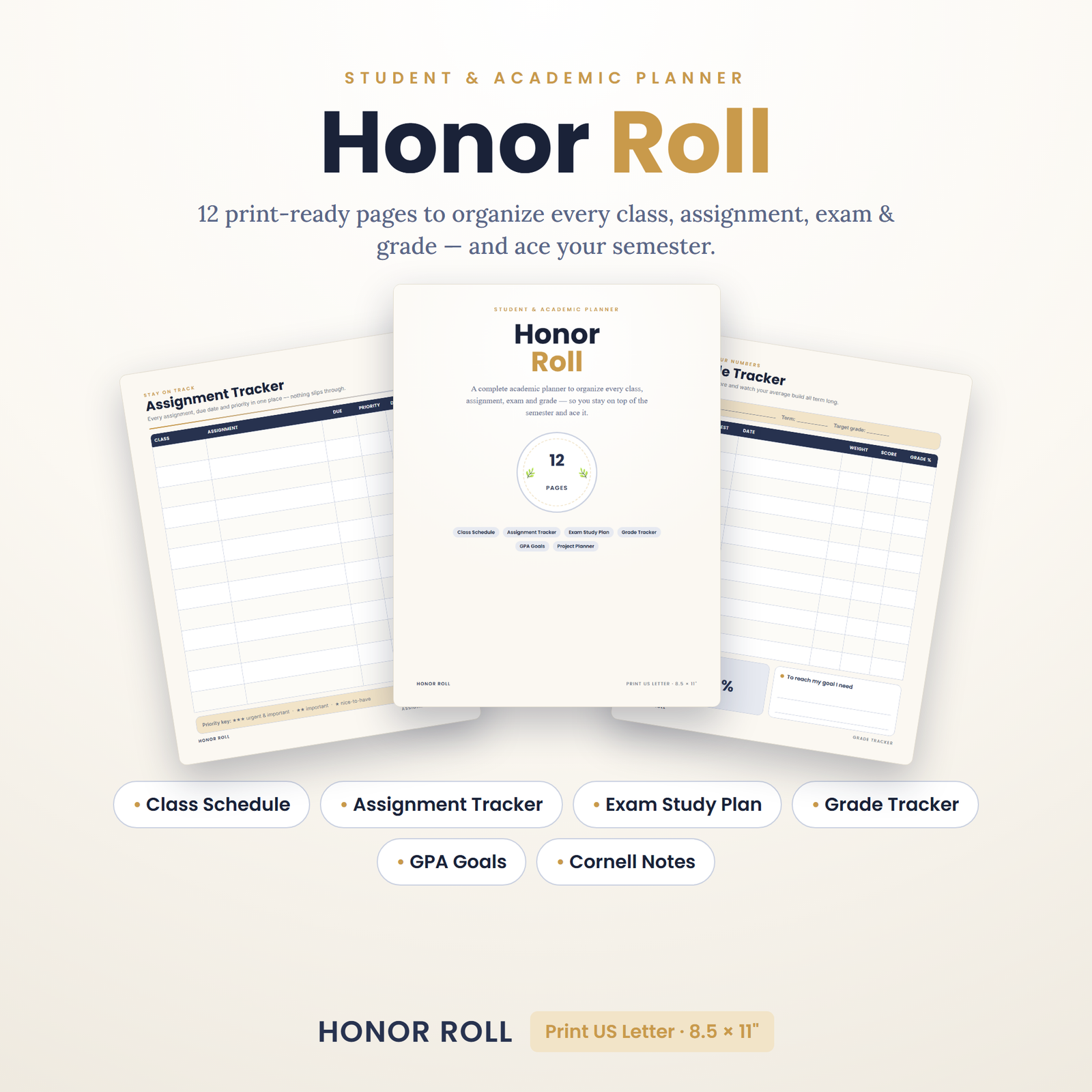
Honor Roll is a complete 12-page printable Student & Academic Planner that helps you organize every class, assignment, exam and grade — so you stay on top of the semester and ace it.
Every semester follows the same arc. Week one feels effortless — a fresh timetable, good intentions, plenty of runway. Then the assignments start stacking, two exams land in the same week, a group project appears out of nowhere, and suddenly you’re studying for the wrong thing at the wrong time and calculating what you’d need on the final just to stay afloat. The difference between students who ride that wave and students who get flattened by it is rarely intelligence — it’s whether they can see the whole semester in front of them. Honor Roll exists to give you that view: one cohesive planner where every class, due date, exam, grade, and study session lives on paper, in a clean indigo-and-gold design you’ll actually enjoy opening.
Why Paper Planning Works for Students
Your phone is where focus goes to die — every calendar check is an invitation to forty minutes of something else. A paper planner sits open on your desk with zero notifications, and the act of writing things by hand does real cognitive work: handwriting engages deeper processing than typing, which is one reason learning researchers consistently find note-taking by hand so effective (the APA’s resources on learning and memory are a great rabbit hole on how memory actually forms). A printable planner adds one more advantage over store-bought ones: it’s modular. Need five assignment tracker pages this month and none next month? Print exactly what the semester demands, for pennies.
What’s Inside: All 12 Pages, Explained
Cover + Welcome / How-to-Print & Terms
A polished cover page for your binder plus a one-page orientation: how to print at 100% on US Letter, how the pages fit together, and usage terms. You’ll be assembled and planning within ten minutes of downloading.
Weekly Class Schedule
Your timetable at a glance — classes, labs, tutorials, work shifts, and practice blocks mapped across the week. Post it above your desk and the “wait, do I have a lecture right now?” panic disappears for good. Reprint whenever the timetable changes.
Assignment Tracker (Due Dates + Priority)
The workhorse page. Every assignment gets a row: course, task, due date, priority, and a satisfying done-box. When everything due is visible in one column, you stop discovering deadlines the night before — and priority ranking means the important essay gets attention before the low-stakes worksheet, not after.
Exam Study Planner
Work backwards from each exam date: topics to cover, sessions scheduled across the days before, progress checkboxes. This page quietly enforces the most evidence-backed study habit there is — spaced practice — by making it natural to spread studying across multiple short sessions instead of one desperate all-nighter.
Grade Tracker (With Running Average)
Log every graded piece of work per course and keep a running average, so you always know exactly where you stand. No more end-of-term surprises, and no more guessing what you need on the final — you’ll see the math coming weeks in advance, while there’s still time to change it.
Semester at a Glance
The big-picture page: exam windows, project milestones, breaks, and key dates for the whole term on one sheet. This is how you spot the brutal week in October two months early — and plan around it instead of getting ambushed by it.
Project / Essay Planner
Big deliverables broken into stages — research, outline, draft, revise, submit — each with its own mini-deadline. Large projects fail as single tasks and succeed as sequences; this page does the sequencing for you.
Reading Log
Track assigned chapters, articles, and readings per course with completion boxes. Reading debt is the sneakiest kind of behind-ness — this page keeps it visible before it compounds into exam-week panic.
GPA Goals + Course Planner
Set a target for the term, map the courses that get you there, and check in as grades arrive. Goals written down and reviewed regularly get met far more often than goals vaguely held — this page is your accountability contract with yourself.
Study Habit Grid
A streak-building grid for daily study habits — review sessions, flashcards, problem sets, reading blocks. Fill a box every day you show up; watch the chain grow; refuse to break it. Small daily consistency is what actually moves grades, and our 31-day habit tracker guide explains how to make a streak stick.
Cornell-Style Class Notes
A ready-to-print note page using the Cornell note-taking system: a cue column for keywords and questions, a wide notes area, and a summary strip at the bottom. Taking notes this way builds in your revision material as you go — by exam time, every lecture page is already a self-quizzing tool. Print a stack and never take messy notes again.
Who Honor Roll Is For
- High school students juggling six or more subjects, extracurriculars, and college prep — the planner scales down as easily as it scales up.
- College and university students managing lecture schedules, labs, readings, and long-deadline essays across a full course load.
- Graduate and returning students balancing coursework with jobs and family, where every planned hour has to count.
- Homeschool families giving teens ownership of their own academic tracking — pairs naturally with our Homeschool Year Planner.
- Parents of students who want to gift a system, not a lecture, to a teen drowning in due dates.
How to Use It: From Download to Dean’s List
- Buy & download instantly. One print-ready PDF arrives the moment checkout completes — no shipping, no waiting.
- Print at 100% on US Letter. Open in any PDF reader and print the pages you need. Printing on A4? Choose “Fit to page” and the layout scales cleanly to ISO 216 A4 used across Europe, Australia, and most of the world.
- Do a 20-minute semester setup. Fill the Weekly Class Schedule, transfer every syllabus date onto Semester at a Glance, and load known assignments into the tracker. This one sitting is worth more than any productivity app you’ve ever downloaded.
- Run a 10-minute weekly review. Every Sunday: update the assignment tracker, log new grades, schedule the week’s study sessions. Ten minutes, once a week, is the entire maintenance cost of never being surprised again.
- Reprint or laminate. Print as many times as you like, or laminate high-reuse pages (schedule, habit grid) and reuse them with a dry-erase marker semester after semester.
Want to go deeper on the method? Our complete student planner guide walks through the full semester workflow page by page, and time blocking with buffers shows how to schedule study sessions that survive contact with real life.
A Semester Playbook: Four Moments That Decide Your Grades
Moment one: syllabus week. Every syllabus you receive is a map of the entire term — most students skim it once and never look again. Honor Roll’s setup ritual turns syllabus week into your biggest advantage: every date goes onto Semester at a Glance, every assessment into the tracker, every exam into the study planner. Thirty minutes per course, and you know things in week one that your classmates will discover the hard way in week nine.
Moment two: the midterm crunch. Somewhere mid-semester, everything lands at once. This is where the priority column on the Assignment Tracker earns its place — when you can’t do everything, doing the right things in the right order is the whole game. The Project/Essay Planner keeps long deliverables moving in the background so the crunch week doesn’t also become draft-from-scratch week.
Moment three: exam season. Two weeks out, the Exam Study Planner takes over. List the topics per exam, spread sessions across the available days, and check them off. Because the Reading Log kept your reading debt visible all term, revision means reviewing material you’ve seen — not meeting it for the first time. Cornell note pages become instant self-quizzing decks: cover the notes column, read the cues, recall out loud.
Moment four: the post-semester review. Ten minutes with the Grade Tracker and GPA Goals page after finals: what worked, what didn’t, what changes next term. Students who close the loop like this improve semester over semester; students who don’t repeat the same crunch every year. The planner makes the review automatic, because the whole story of your semester is already written down.
Study Methods the Planner Bakes In
Good planners are quietly opinionated, and Honor Roll’s pages are built around methods with real evidence behind them. Spaced sessions over cramming: the Exam Study Planner’s day-by-day layout makes distributing practice the path of least resistance. Retrieval over re-reading: Cornell cue columns prompt you to pull answers from memory, which strengthens it far more than passively highlighting. Time blocking over vague intentions: the Weekly Class Schedule shows your genuinely free hours, so “study more” becomes “Tuesday 3–5, library, chapter six” — and our time blocking guide shows how to add buffers so one overrun doesn’t wreck the day. Streaks over willpower: the Study Habit Grid turns showing up daily into a game you’ll hate to lose. None of these methods require the planner — but the planner makes all of them the easy default, which is what actually changes behavior over a fourteen-week term.
Printable vs. Store-Bought vs. App: An Honest Comparison
| Honor Roll (printable) | Store-bought planner | Planner app | |
|---|---|---|---|
| Cost over 4 years | One purchase, reprint forever | New planner every year | Free–subscription |
| Academic-specific pages | Yes — grades, exams, GPA, Cornell notes | Rarely; mostly generic weeks | Some, buried in menus |
| Distraction risk | Zero | Zero | It’s on your phone |
| Customization | Print any mix of pages, any quantity | Fixed layout | Limited by the developer |
| Undated / reusable | Yes — start any semester | Usually dated (wasted months) | Yes |
| Memory benefit of handwriting | Yes | Yes | No |
The honest verdict: apps are excellent reference tools and terrible focus tools, store-bought planners are pleasant but generic and expire every December, and a printable academic planner gives you subject-specific pages, infinite reprints, and zero notifications for the price of a coffee. If your grades are decided at a desk, the planner should live on the desk — open, visible, and impossible to swipe away.
Details & Compatibility
- Instant digital download — 1 print-ready PDF (US Letter, 8.5 × 11 in), scales cleanly to A4
- Opens in any free PDF reader on Windows, Mac, tablet, or phone
- Undated — start in September, January, or mid-semester; nothing is wasted
- Print as many times as you like, or laminate and reuse with a dry-erase marker
- Also works in annotation apps like GoodNotes on a tablet — import the PDF and plan with a stylus; see our GoodNotes digital planning guide
- Clean, modern indigo + gold design — perfect for high school, college & university
- Grade tracker works with any grading system — percentages, letters, points, GPA scales worldwide
Pairs Well With
- 300 ChatGPT Prompts for Students — study-smarter prompts for summarizing readings, generating practice questions, and planning essays, the perfect digital companion to your paper system.
- Student OS Notion Template — if you also live in Notion, this digital dashboard mirrors the planner’s structure for hybrid paper + digital students.
- Level Up 90-Day Goal Planner — turn “get better grades” into a structured 90-day campaign with milestones that line up neatly with a semester.
Keep Learning: Guides From the Pixquo Blog
Browse the planners & productivity hub for our full library of planning systems and methods, or compare options in the best printable planners of 2026. Shopping from outside the US? Find localized collections through the printables & planners by country hub, including regional pages for Australia and the United Kingdom.
For Parents: Gift a System, Not a Nag
If you’re a parent watching a capable student sink under disorganization, you already know that reminding harder doesn’t work — every prompt lands as pressure, and the underlying problem (no system) stays unsolved. Handing over a planner changes the conversation. Instead of “did you do your homework?”, it becomes “what does your tracker say this week?” — a question about a shared tool rather than a judgment about a person. Print the set, add a nice binder and pens, and offer to sit in on the first Sunday review. Then step back: the planner’s whole design is that the student owns it. Most teens who resist being managed respond surprisingly well to being equipped — especially with pages that look this good on a desk.
Back-to-school season is the natural moment, but mid-year rescues work just as well: because the planner is undated, a rough first term can end with a clean-slate setup in January instead of waiting for a new school year. And since one purchase prints forever, younger siblings inherit the system for free when their turn comes.
Frequently Asked Questions
Is this planner dated or undated?
Undated. You write in your own dates, which means you can start any week of any semester, reuse it every term, and never waste a page. One purchase covers your whole academic career.
Will it work for my school’s grading system?
Yes. The grade tracker uses open fields, so percentages, letter grades, points-based rubrics, and GPA scales from any country all fit. High school, college, university, and postgraduate students use the same pages differently — that flexibility is the design.
Can I use it on my iPad with GoodNotes or Notability?
Absolutely. Import the PDF into GoodNotes, Notability, or any annotation app and write on the pages with a stylus — many students run a hybrid setup with the class schedule printed on the wall and the rest digital. Our GoodNotes guide shows the setup in five minutes.
I’m outside the US — will it print on A4?
Yes. The pages are designed at US Letter size; select “Fit to page” in your print dialog and they scale perfectly onto A4 with nothing cut off. Students across Europe, Australia, Asia, and Africa print this planner every day.
How many times can I print it?
As many as you like, forever, for your own use. Print fresh assignment trackers every month, a new schedule each semester, and a full set for the new academic year — your license never expires.
When do I receive the files?
Immediately after purchase. Download links appear on your confirmation page and in your email — you can be printed, punched, and planning tonight. No physical item is shipped.
Instant Download & License
Instant digital download — 1 print-ready PDF, available the moment your order completes. For personal use only: please do not resell, share, or redistribute the files. All designs © Honor Roll. See our refund policy for digital purchases, or contact us with any question before you buy.
The semester is coming either way — the only question is whether you meet it with a system or with good intentions. Download Honor Roll today, spend twenty minutes on the setup ritual, and walk into week one already knowing every deadline, every exam, and exactly where your grades stand. Future you, calmly reviewing a full tracker the night before finals begin, will be very glad you did.
Explore More Digital Tools
- Browse the full shop — planners, trackers, prompt packs and printables
- Free printables library
- Budgeting & saving guide · Planners & productivity guide
- Paper sizes & currency by country
Every Pixquo product is an instant download — no shipping, no waiting.
Reviews
There are no reviews yet.