
Description
Stop guessing what your business actually made this year
Most small business owners do not have a bookkeeping problem. They have a “shoebox in January” problem. Receipts pile up, invoices go unchased, the mileage never gets logged, and then the tax deadline arrives and you spend a weekend reconstructing twelve months from bank statements and memory — and you still end up guessing.
This is a real, working spreadsheet that fixes that in about two minutes a week. You log money in, you log money out, and everything else calculates itself: profit, margin, what each category is costing you, which invoices are overdue and by how many days, your mileage deduction, your quarterly figures, and the exact amount you should be moving into a savings account for tax before you spend it.
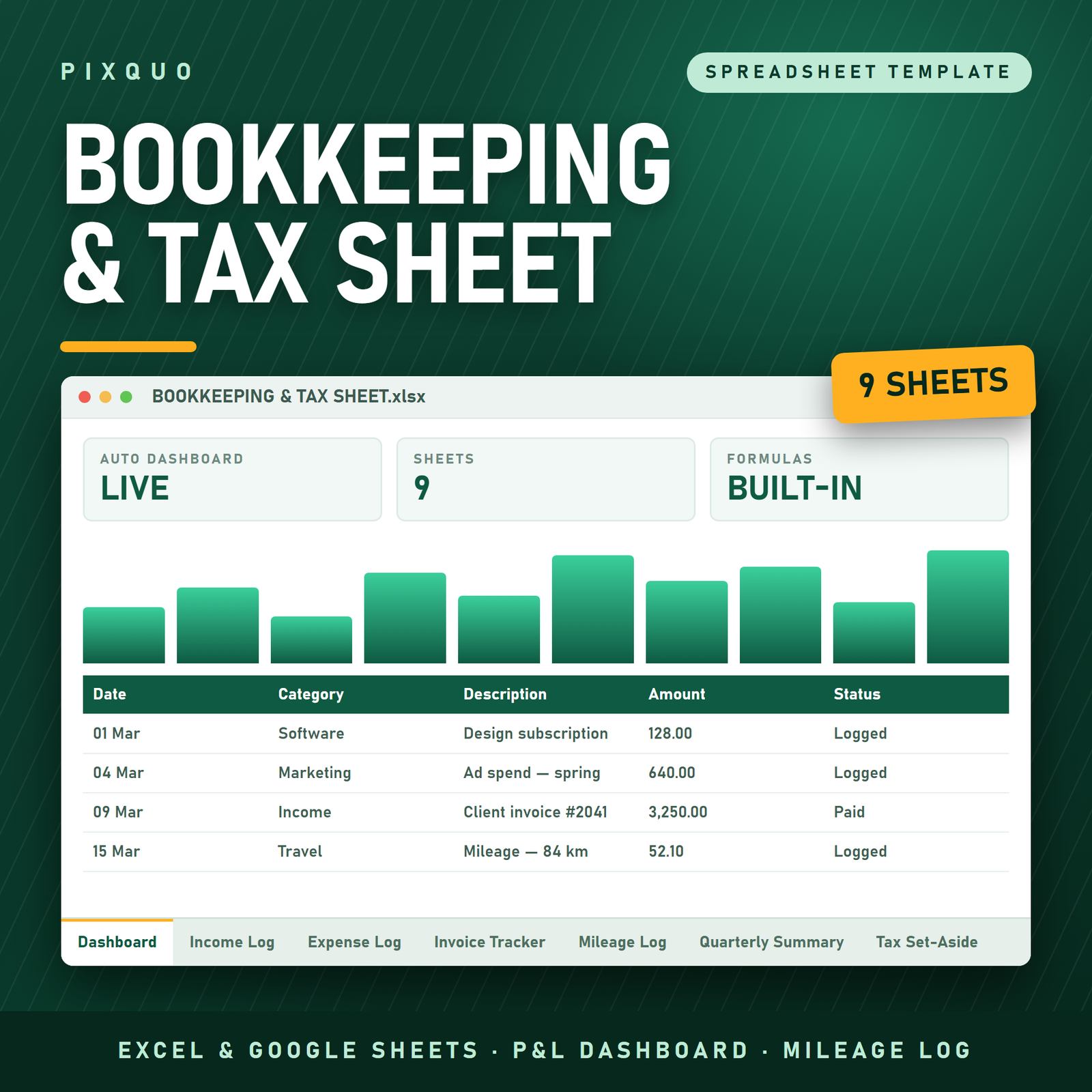
It is nine connected sheets built with live cross-sheet formulas, dropdown lists so your categories always match, frozen headers, filters, and a dashboard that reads like a report rather than a wall of numbers. Set your currency once on the Settings tab — dollars, euros, pounds, rand, rupees, anything — and every figure on the dashboard follows it.
What is inside the file
- Profit & Loss Dashboard — total income, total expenses, net profit, profit margin, unpaid invoices, how many invoices are overdue right now, deductible expenses, mileage deduction, taxable profit, tax to set aside, and what you still owe your tax pot. Underneath: income by category, expenses by category, and a quarter-by-quarter snapshot. Nothing here is typed. All of it calculates.
- Income Log — date, invoice number, client, description, category (dropdown), amount, how you were paid, notes. 400 rows with a locked total row and an autofilter so you can slice by client or month in one click.
- Expense Log — date, vendor, description, category (16-item dropdown covering advertising, bank and card fees, cost of goods, contractors, software, office, rent and utilities, travel, meals, insurance, professional fees, vehicle and fuel, training, repairs, taxes and licences, other), amount, how it was paid, a Deductible? flag and a Receipt? flag. Only the rows you mark deductible feed the tax calculation, so personal spend never quietly inflates your claim.
- Invoice Tracker — invoice number, client, issue date, due date, amount, status (Draft, Sent, Part Paid, Paid, Overdue, Written Off), date paid. Balance Due clears itself the moment you mark an invoice Paid, and Days Overdue counts live against today’s date. This is the tab that gets you paid faster.
- Mileage Log — date, purpose, from, to, distance, rate, deduction. Enter the distance; the rate pulls from your Settings tab and the deduction calculates. Works in miles or kilometres.
- Quarterly Summary — Q1 to Q4 plus a full-year row, each showing income, expenses, net profit, margin and tax to set aside, built automatically from the dates on your logs. Exactly what you need in front of you for a quarterly filing or an estimated payment.
- Tax Set-Aside Calculator — a clean eleven-line worksheet that walks from total income, through deductible expenses and mileage, to taxable profit, applies your own set-aside rate, and tells you the number to move across. Two manual lines let you enter other allowances and what you have already put aside, so the “still to set aside” figure is honest.
- Settings — currency symbol, business name, tax year, set-aside rate, mileage rate, distance unit. Six cells. Change them once.
- Instructions — how to open it in Excel and in Google Sheets, what every tab does, how to clear the sample data without breaking the formulas, and the licence terms in plain English.
Who this is for
Sole traders, freelancers, consultants, coaches, designers, photographers, trades, Etsy and Shopify sellers, virtual assistants, small agencies — anyone running a business small enough that dedicated accounting software is overkill or over-priced, but big enough that a pile of receipts is no longer a system.
It is deliberately country-neutral. There are no hard-coded tax rates, no US-only forms, no assumptions about your filing regime. You set your own set-aside percentage and your own mileage rate, you pick your own currency, and dates are written in the unambiguous YYYY-MM-DD format so a European and an American reading the same file see the same day. If you work with clients in more than one country, that alone saves arguments.
How to use it
- Open the Settings tab. Set your currency symbol, business name, tax year, tax set-aside rate, mileage rate and whether you count miles or kilometres. That is the entire setup.
- Clear the sample rows from the four log tabs. The Instructions tab shows you exactly how — clear contents, do not delete rows.
- Log income and expenses as they happen. Two minutes on a Friday beats a lost weekend in tax season.
- Add a row to the Invoice Tracker every time you raise an invoice, and change the status when it is paid. Watch the Days Overdue column and chase the ones with a number in it.
- Check the Dashboard whenever you want the truth, and the Tax Set-Aside tab before you spend a big payment.
Formats and compatibility
You receive a single .xlsx workbook inside a zip, plus a plain-text quick-start and licence file. It opens natively in Microsoft Excel (Windows, Mac, Microsoft 365, Excel 2016 and later) and uploads straight into Google Sheets for free — formulas, dropdown lists, frozen headers and filters all carry across. It also opens in Apple Numbers and LibreOffice Calc, where formulas work and some styling may shift slightly. Nothing to install, no subscription, no account.
Pairs well with
- Side Hustle Income & Expense Tracker — the lighter version, if you are earning on the side rather than running a registered business.
- Annual Budget & Paycheck Planner Spreadsheet — for the personal side of the money, once the business side is under control.
- Personal Net Worth & Financial Goals Tracker — track what the business is actually building for you.
Reading first? Start with our guides on building a digital product side hustle and budgeting and saving money.
Questions people ask before buying
Do I need Microsoft Excel to use this?
No. Google Sheets is free and opens the file perfectly — upload it to Google Drive, right-click, Open with Google Sheets, then File > Save as Google Sheets for a live copy. The Instructions tab walks you through it in four lines.
Will it work in my country and my currency?
Yes. The currency symbol is set in one cell on the Settings tab and flows through the whole dashboard, so it works just as well in euros, pounds, rand, rupees or dollars. Tax rates are not hard-coded anywhere — you enter your own set-aside percentage and your own mileage rate, which is what makes it usable outside the US.
Is this tax advice?
No, and it does not pretend to be. It is an organising and calculation tool. The set-aside figure is your own rate applied to your own numbers, which is enormously better than guessing, but what counts as deductible and what rate you actually owe depends on your country, your business structure and your year. Check your figures with a qualified accountant.
How many rows can I enter?
Each log holds 400 rows as shipped, with the totals and dashboard formulas already covering that range. That is comfortably more than a year of transactions for most small businesses, and you can extend the ranges if you need more.
Can I use it for more than one business?
Yes — save a separate copy of the file for each business you own. The licence covers your own use and your own businesses. It does not allow you to sell, share or redistribute the file.
What if I have already started my financial year?
Enter what has happened so far in one sitting from your bank statements — most people get a half-year caught up in under an hour — then keep it current weekly. The quarterly and annual figures fill in from the dates, so back-dated entries land in the right quarter automatically.
Instant download and licence
This is a digital product. Your download link is available immediately after checkout, with no expiry and no download limit — save the file and re-download it any time. Nothing is shipped.
Licensed for personal and single-business use: use it for yourself and your own businesses on as many of your own devices as you like. You may not resell, redistribute, share, sublicense or repackage the file or its contents. Because the file is delivered instantly and cannot be returned, all sales are final.
Microsoft Excel and Google Sheets are trademarks of their respective owners. This product is independent and is not affiliated with, endorsed by or sponsored by Microsoft or Google; those names are used only to describe the software the file opens in.
Explore More Digital Tools
- Browse the full shop — planners, trackers, prompt packs and printables
- Free printables library
- Budgeting & saving guide · Planners & productivity guide
- Paper sizes & currency by country
Every Pixquo product is an instant download — no shipping, no waiting.



Reviews
There are no reviews yet.