
Description
Your money admin is scattered across six places, and none of them talk to each other
Most people don’t have a budgeting problem. They have a fragmentation problem. The current account balance lives in a banking app. The credit card payoff plan lives in a note on a phone, half-finished. Business invoices sit in an email folder. The side hustle income is a mental estimate. The subscriptions nobody cancelled are quietly draining an account that nobody audits. Tax money is “in there somewhere”. And every few months there’s a Sunday evening where you sit down, open a blank spreadsheet, promise yourself this is the system, and abandon it by Wednesday because building the thing is harder than the thing itself.
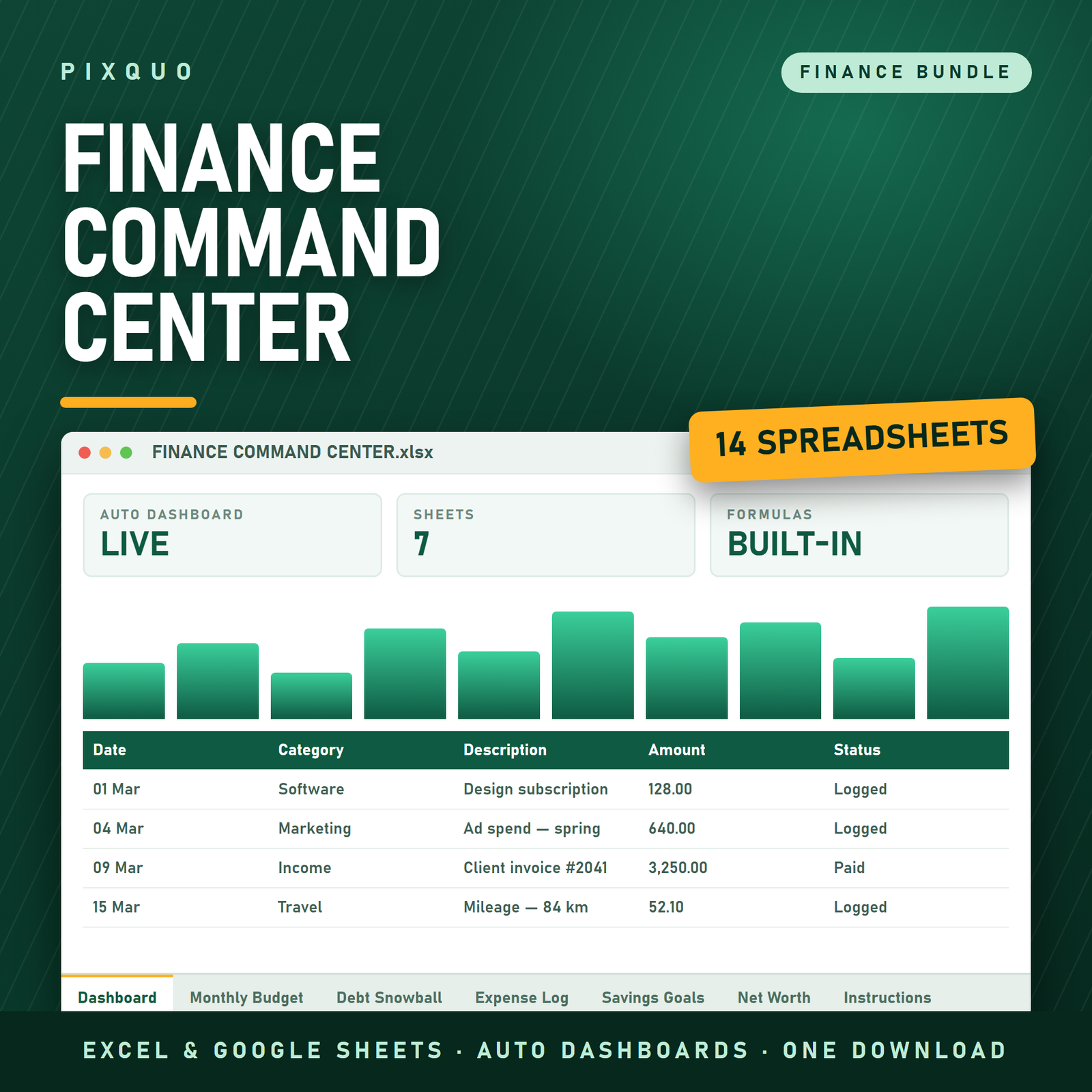
The Finance Command Center Bundle is the shortcut past the building part. It is 14 spreadsheet templates covering personal budgeting, debt payoff, savings, business bookkeeping, freelance tax estimation, side income, property analysis and project budgets — every one of them already built, already formula-driven, and ready to open in Microsoft Excel or Google Sheets and start typing numbers into.
This is for the person whose money life doesn’t fit in one neat box. The freelancer who also has a joint household budget. The couple attacking a credit card while saving for a house deposit. The small business owner who keeps mixing personal and business spending because there was never a clean place to separate them. The employee with a side hustle that’s growing awkwardly fast. The person doing a kitchen renovation while also trying to figure out whether a rental property is worth an offer. If your finances have more than one moving part, buying trackers one at a time is the expensive, slow way to do it.
A plain warning before anything else: these are tracking tools, not advice. They calculate what you enter. They do not know your tax jurisdiction, your filing status, or your local rules, and nothing here is financial, tax, investment or legal advice. Where tax is involved, confirm your figures with your own accountant before you file anything or make a decision based on them.
Everything included — all 14 spreadsheets
This is the complete list. Fourteen files, nothing hidden, nothing “coming soon”. Twelve arrive as Excel .xlsx workbooks; two arrive as .zip archives containing both an Excel version and a Google Sheets version. They’re grouped below by the job they do.
Personal budgeting and savings
- Zero-Based Budget Tracker (Excel & Google Sheets) — $12 separately. Zero-based budgeting means every unit of income gets assigned a job until income minus assignments equals zero. This is the template for running that method rather than eyeballing it, and it ships in both Excel and Google Sheets flavours.
- Annual Budget & Paycheck Planner Spreadsheet (Debt Snowball & Sinking Funds) — $9.99 separately. The year-level view: planning across twelve months rather than one, mapped to when you actually get paid, with sinking funds for the irregular costs that wreck monthly budgets — car tax, insurance renewals, Christmas.
- Paycheck Budget by Income Level — $7 separately. Budgeting structured around what you actually earn, so the allocations make sense at your income rather than at some generic template income.
- 52-Week Savings Challenge — $5 separately. The classic escalating weekly savings challenge, tracked properly so you can see the running total instead of losing count at week nine.
- Subscription & Bill Tracker — $8.99 separately. Every recurring charge in one list with its renewal date and cost. This is often the fastest money any of these templates finds, because almost nobody can name all their active subscriptions from memory.
- Personal Net Worth & Financial Goals Tracker — $9.99 separately. Assets minus liabilities, tracked over time, with goals attached. This is the scoreboard the monthly budget feeds into — the one number that tells you whether the last twelve months of effort actually moved anything.
Debt payoff
- Debt Payoff & Snowball Tracker Spreadsheet (Excel & Google Sheets, Snowball vs Avalanche, payoff dates, interest saved) — $12.99 separately. The most detailed debt tool in the bundle: compare the snowball method (smallest balance first, for momentum) against the avalanche method (highest interest rate first, for mathematical efficiency), and see projected payoff dates and interest saved for each. Ships in both Excel and Google Sheets versions.
- Debt Payoff Tracker — $10.76 separately. A simpler, lighter payoff tracker for when you don’t need the full strategy comparison and just want to log balances coming down.
Business, freelance and side income
- Business Financial Dashboard & Profit-Loss Tracker — $19 separately, the single most expensive item here. Income in, costs out, profit and loss summarised at a dashboard level rather than buried in a transaction list.
- Freelancer Income & Tax Estimator — $15 separately. Logs freelance income and estimates the portion to hold back for tax, so the money is set aside as it arrives rather than found in a panic later. Estimates only — your accountant has the final word.
- Small Business Bookkeeping — $10.76 separately. Structured income and expense recording for a small business, which is the difference between handing your accountant a shoebox and handing them a file.
- Side Hustle Income & Expense Tracker — $7.99 separately. Keeps the side income separate from household money so you can see whether the hustle is genuinely profitable once costs are counted.
Property and projects
- Real Estate Investment Property Analyzer — $9.99 separately. Runs the numbers on a potential investment property before you commit, so the decision is arithmetic rather than a feeling about the kitchen.
- Home Renovation & Project Budget Tracker — $9.99 separately. Budget versus actual across a renovation or any multi-line project, which is where overspend hides — never in one big shock, always in fifteen small ones.
What this actually costs versus buying them one at a time
No invented anchors, no theatre. Here is the arithmetic, using the current listed price of every component:
- Buying all 14 templates individually at their current listed prices: $149.45
- This bundle: $49.00
- You save: $100.45, roughly 67%
The bundle also carries a regular price of $179.00, currently listed at $49.00. But the honest comparison — the one that matters when you’re deciding — is the $149.45 you’d spend adding all fourteen to a cart individually versus the $49.00 you spend here. That’s the only value claim on this page, and you can verify it yourself by opening each product link above and adding the numbers.
Break it down and the bundle price works out at roughly three and a half dollars per template. The Business Financial Dashboard and the Freelancer Income & Tax Estimator alone list at $34 between them — most of the bundle price for two of the fourteen files.
Which group is for you — concrete cases
Nobody uses all fourteen at once, and you shouldn’t try. Most people live in two or three of these and dip into the rest as life changes. Here’s how the groups map onto real situations.
The freelancer who keeps getting surprised by tax
You invoice irregularly. Some months are excellent, some are quiet, and the money all lands in one account where it stops looking like business income and starts looking like spending money. The Freelancer Income & Tax Estimator is the fix: log each payment as it arrives, see the estimated tax portion, move that amount out of reach. Pair it with the Small Business Bookkeeping template so expenses are recorded as you go, and by year end you have a file rather than a reconstruction project. Confirm the actual tax figures with your accountant — the estimator is there so the money exists when the bill does, not to replace professional advice.
The couple killing a credit card
Two incomes, one balance you both want gone, and a disagreement about whether to attack the small store card first because it feels good or the big high-interest card first because it’s cheaper. The Debt Payoff & Snowball Tracker settles it — enter the debts once, look at the projected payoff dates and interest saved under snowball versus avalanche, and pick with the numbers in front of you. Then run the household on the Zero-Based Budget Tracker so the extra payment is a planned line rather than whatever happens to be left. Do a subscription audit first with the Subscription & Bill Tracker; the cancelled ones usually fund a chunk of the extra payment on their own.
The landlord screening a property
An agent sends a listing. It looks good. “Looks good” has cost a lot of people a lot of money. The Real Estate Investment Property Analyzer exists so you enter purchase price, expected rent and running costs and get a comparable answer for every property you look at — which means you can screen ten in an evening and only get emotionally involved in the one that survives. If the plan involves refurbishing before letting, the Home Renovation & Project Budget Tracker keeps the works budget honest against actuals.
The employee with a side hustle that’s outgrowing “a bit of fun”
Etsy sales, weekend photography, freelance design in the evenings. The trap is that revenue feels like profit because the costs are scattered across a personal card. The Side Hustle Income & Expense Tracker separates it out, and the moment it’s genuinely a business the Business Financial Dashboard & Profit-Loss Tracker is already in your download folder waiting. If growing this is the plan, The Passive Income Playbook is a useful companion read on the strategy side while these handle the numbers side.
The person starting from zero
No system, no idea where the money goes, mild dread about looking. Start with the Paycheck Budget by Income Level and the 52-Week Savings Challenge — one gives structure, the other gives an early win, and early wins are what stop people quitting in week three. If the vocabulary is unfamiliar, Budgeting for Beginners covers the concepts these templates assume. Six months later, the Personal Net Worth & Financial Goals Tracker is where you go to see that it worked.
Your first week: a realistic setup plan
The failure mode with a 14-file bundle is hoarding — you download everything, feel organised, open nothing. Here’s a week that ends with a system you’re actually using. Total time commitment is maybe three hours across seven days.
Day 1 — Download and delete (20 minutes)
Download all fourteen from your account page. Make one folder. Then be ruthless: move the ones that don’t apply to your life right now into a subfolder called “Later” and close it. If you don’t own property, the analyzer is not this week’s problem. Most people are left with three or four files. That’s the correct number.
Day 2 — The subscription audit (30 minutes)
Open the Subscription & Bill Tracker and go through the last three months of bank and card statements line by line. Log every recurring charge. This is the single highest-return half hour in the whole bundle and it requires no discipline afterwards — you cancel what you find and the saving is permanent.
Day 3 — Set up the main budget (45 minutes)
Pick one budgeting template and commit. Zero-based thinker? Zero-Based Budget Tracker. Prefer to plan around paydays? Paycheck Budget by Income Level. Thinking in years and want sinking funds? The Annual Budget & Paycheck Planner. Running two of them in parallel is how people end up running none.
Day 4 — Face the debt (30 minutes)
If you carry balances, enter every one into the Debt Payoff & Snowball Tracker: balance, rate, minimum payment. Look at both strategies, choose one, write the payoff date somewhere you’ll see it. Seeing a date at all is the part that changes behaviour.
Day 5 — Business and side income (30 minutes)
If you earn outside a salary, set up the relevant file today — Small Business Bookkeeping, the Side Hustle Income & Expense Tracker, or the Business Financial Dashboard depending on scale. Backfill the current month only. Do not attempt to backfill the year; that ambition has killed more bookkeeping systems than laziness ever has.
Day 6 — Baseline the scoreboard (20 minutes)
Open the Personal Net Worth & Financial Goals Tracker and record today’s honest position: what you own, what you owe. It might be an uncomfortable number. It’s also the only number that lets you prove progress later.
Day 7 — Schedule the habit (10 minutes)
Put two recurring events in your calendar: fifteen minutes weekly to update the budget and any income logs, and forty-five minutes monthly to update net worth, review debt progress, and check nothing new has quietly started billing you. This step is what separates people who own these templates from people who use them. Everything above takes a week; this makes it stick for a year.
Formats, compatibility and delivery
Everything in this bundle is a spreadsheet. Being precise about that, because it determines whether it’s right for you:
- Microsoft Excel .xlsx — 12 of the 14 files are supplied directly as .xlsx workbooks.
- .zip archives — 2 of the files ship as .zip containing both an Excel version and a Google Sheets version. Unzip and use whichever you prefer.
- Google Sheets compatible — the .xlsx files upload to Google Drive and open with Google Sheets. Formulas recalculate in both Excel and Sheets.
- Formulas are built in — totals and calculations are already written. You enter your figures; the sheet does the arithmetic.
- Windows, macOS and browser — works with Excel on Windows or Mac, and in any browser through Google Sheets.
- Mobile — Excel mobile and Google Sheets mobile will open the files, but honestly, sustained data entry on a phone screen is unpleasant. Set up on desktop, glance on mobile.
- Instant download — files are available immediately after purchase from your account and order pages.
What this bundle is not: it is not a set of printables. There are no PDFs, no A4 or US Letter print-formatted pages, no GoodNotes or tablet-annotation files. If you were after a paper planner you want the printables side of the catalogue, not this. And there is no app, no login, no cloud service — these are files that live on your machine or your Drive, and they keep working whatever happens to any website.
Frequently asked questions
Is this worth it if I only need one or two of the trackers?
Straight answer: do the arithmetic before you buy. If the templates you genuinely want add up to more than $49.00, the bundle wins. If you only want the Debt Payoff & Snowball Tracker at $12.99, buy that one on its own — it is cheaper, and paying $49 for a single $12.99 file would be a bad deal and we’re not going to pretend otherwise. Two templates usually still lose to buying them individually. Three or four starts getting close. Five or more and the bundle is clearly the better buy, and you also end up with the other nine for nothing. Open the product links above, add up the ones you actually want, compare to $49.00, and decide on that.
Do I get future additions to this bundle?
No. You receive the 14 files attached to this product at the time of your purchase. If more templates are added to this bundle later, they are not automatically pushed out to previous orders. Please buy this for the 14 spreadsheets listed on this page and nothing else — that list is the complete and exact thing you are paying for. We’d rather be blunt about this than have you expect an ongoing stream of files that isn’t coming.
What’s the refund position on a large digital purchase?
Being honest rather than reassuring: digital files can’t be returned once they’re downloaded, so refunds on digital products are not automatic. That said, you should get what the page describes. If a file is corrupt, won’t open, or isn’t as described, contact the store and it will be put right — a working replacement or a resolution. We’re not quoting a specific day-count window here because we’d rather you contact us with the actual problem than count days. What we won’t do is pretend a downloaded set of spreadsheets can be handed back.
Excel or Google Sheets — which should I use?
Whichever you’ll actually open. Excel on desktop handles large data entry more comfortably and is the format the majority of these files ship in natively. Google Sheets is better if you want access from any device, or if a partner or business co-owner needs to see the same file without emailing versions back and forth — for a shared household budget or a two-person business, that alone usually decides it. Upload an .xlsx to Drive and open with Sheets; formulas recalculate. Two of the files include a purpose-made Google Sheets version in the .zip.
Do I need accounting knowledge to use these?
No. The formulas are already written — your job is entering numbers into labelled fields, not building calculations. If terms like sinking funds, zero-based budgeting or net worth are unfamiliar, Budgeting for Beginners covers the concepts in plain language. Basic spreadsheet familiarity helps — knowing how to type in a cell and save a file is genuinely enough. The bookkeeping and business templates assume slightly more comfort with financial terms simply because that’s the territory, but none of it requires training.
Can I use this for both business and personal finances?
Yes, and that mixture is the main reason this bundle exists. Six templates are personal, two are debt-focused, four cover business and freelance, two handle property and projects. A freelancer with a household, or a small business owner with a mortgage and a side project, is exactly who ends up using files from three different groups at once. Keeping business and personal in separate purpose-built files is also the practical way to stop the two blurring together — which is the thing that makes tax time painful. Where tax is involved, check the figures with your accountant.
Is this a subscription?
No. One-time payment, files are yours, no recurring charge, no renewal, no account to maintain. Download them, keep them, use them for as long as you own a computer.
Can I use these templates for client work or resell them?
These are supplied for your own personal and business use. Reselling, redistributing or repackaging the files themselves isn’t permitted. Using them to manage your own company’s or your own household’s finances — including a business you run for clients — is exactly what they’re for.
What if I want to change or extend a template?
Go ahead. They’re ordinary spreadsheets, not locked applications — add rows, rename categories, insert a column, change the currency formatting to match where you live. That’s a real advantage of spreadsheets over budgeting apps: nobody can decide your category structure for you. Save a copy of the original before you start heavy surgery, so you can get back to a clean version if an edit goes sideways.
Where to go from here
If this bundle is more than you need right now, every component is available on its own — browse the budgeting & finance category and pick up just the two or three that match your situation. If you’d rather see what else is packaged together at a lower per-item cost, the bundles category collects them. And if you’re building a wider toolkit rather than solving one problem, the full shop has the rest of the catalogue.
For the reading side of the same project, Budgeting for Beginners pairs naturally with the personal budgeting templates here, and The Passive Income Playbook sits alongside the side hustle and business trackers for anyone trying to grow income rather than just organise it.
Fourteen spreadsheets. $149.45 if bought separately, $49.00 together. Instant download, one payment, no subscription, and a week of setup between you and a money system that finally lives in one place.
Explore More Digital Tools
- Browse the full shop — planners, trackers, prompt packs and printables
- Free printables library
- Budgeting & saving guide · Planners & productivity guide
- Paper sizes & currency by country
Every Pixquo product is an instant download — no shipping, no waiting.

Reviews
There are no reviews yet.